
TenPayGo Review 2026: WeChat Pay Without a Phone Number
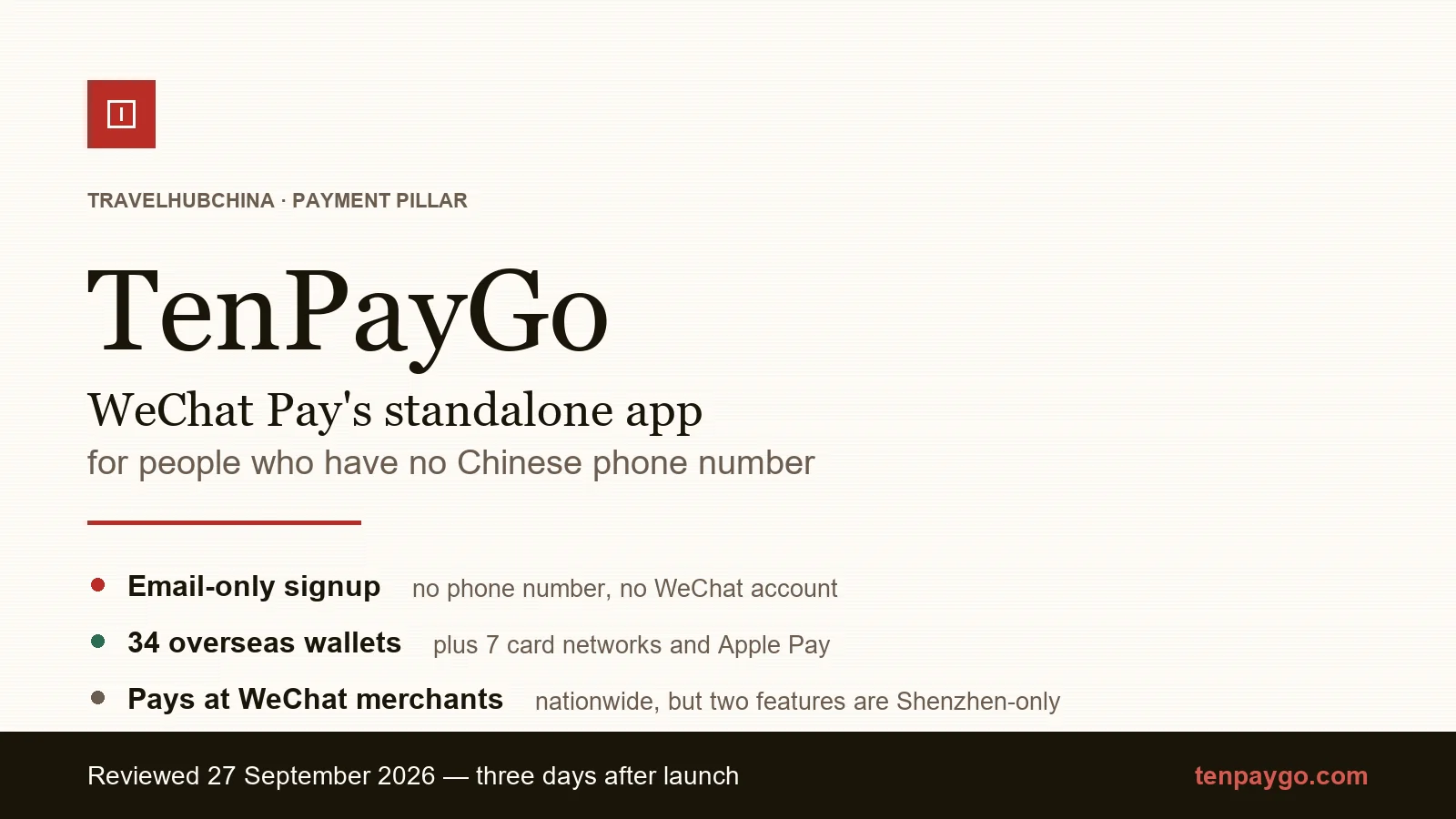
TenPayGo is WeChat Pay's standalone app for foreign visitors — email signup, no Chinese number, no WeChat account. Our hands-on review.
TenPayGo is a new app from the WeChat Pay team at Tencent, released on 24 September 2026 — three days before we wrote this. It is the first time a major Chinese payment network has shipped a standalone app aimed specifically at short-term foreign visitors, and its pitch is blunt: register with an email address, skip the Chinese phone number entirely, and pay at any WeChat Pay merchant in the country.
That promise is real. Whether the app is ready for your trip is a different question, and it is a much shorter one.
What TenPayGo actually is
TenPayGo runs on WeChat Pay’s existing “foreign card bound” (外卡内绑) and “foreign wallet accepted” (外包内用) infrastructure. It is not a third payment network — it is a third way into the one network that already accepts most of China’s commerce.
What sits inside the app:
- Payment at every merchant showing a WeChat Pay QR code — restaurants, shops, taxis, hotels, metro gates, attractions
- AI conversation translation, built around talking to drivers
- AI camera — point at a menu or a sign, get an explanation or a translation; when it recognises a menu it turns into a tappable ordering list
- Shenzhen transit card (深圳通) for the Shenzhen Metro and buses — no phone number, no real-name verification
- Duty-free tax refund entry, via ICBC’s Shenzhen branch
What is deliberately absent: chat, Moments, mini-programs, transfers, stored balance.
Who it is for — and who should skip it
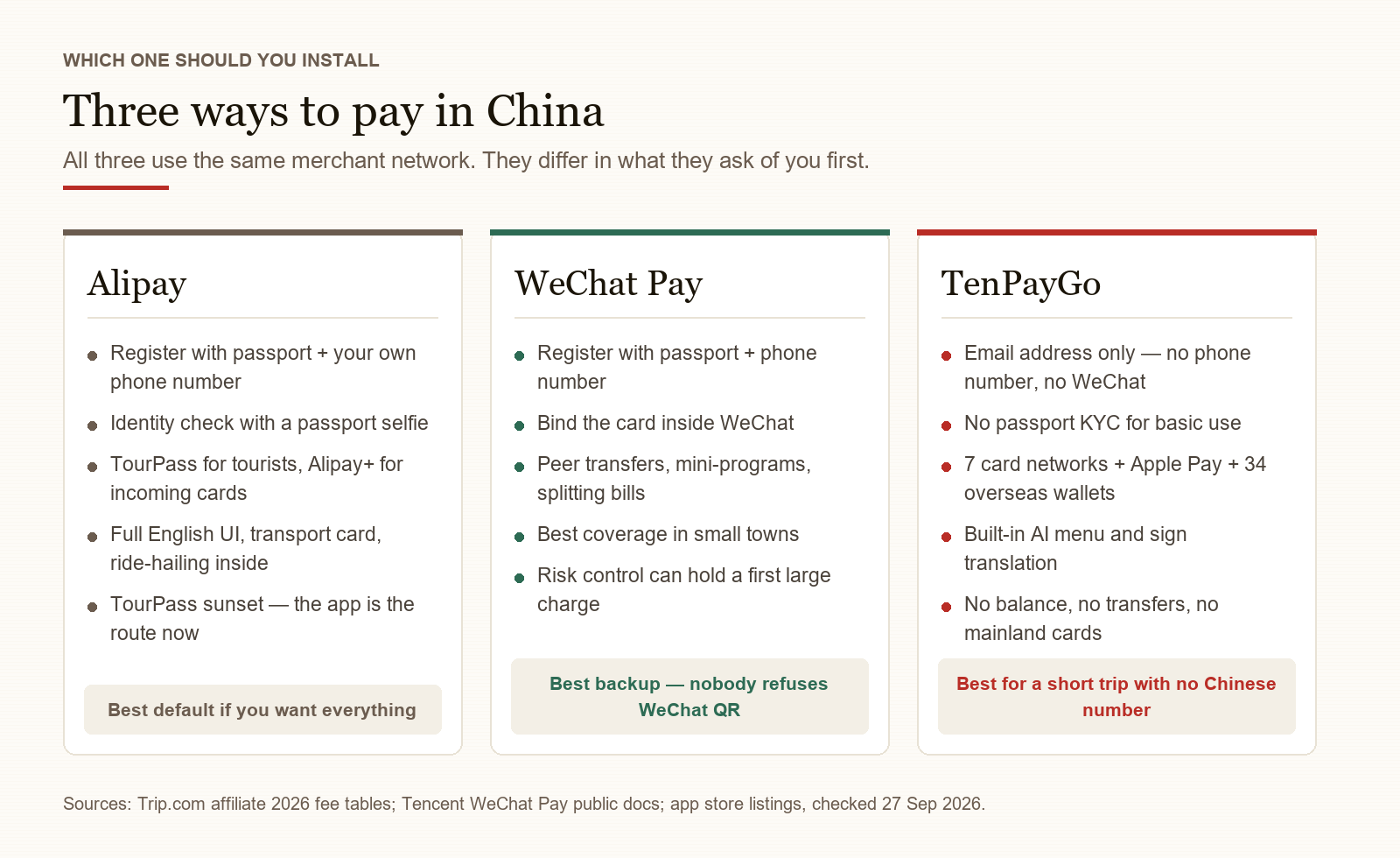
TenPayGo is a visitor app, and Tencent’s own FAQ is blunt about the boundary.
It fits you if you are here for days or a few weeks; you do not have a Chinese mobile number; you do not want to adopt a super-app for one trip; and you have an international card, Apple Pay, or a wallet on the supported list.
Skip it if you live in China. You cannot bind a mainland bank card, you cannot hold a balance (the single exception is the Shenzhen transit top-up, and that money only pays for rides), and there are no person-to-person transfers. It is a payment front-end, not an account. If a shop asks you to “transfer to my personal code”, that is a personal collection — TenPayGo cannot do it; ask for the merchant code instead.
If your trip runs past a month, WeChat Pay and Alipay remain the full-feature answer. See our WeChat Pay setup guide and Alipay guide.
Setup: about five minutes, and no phone number
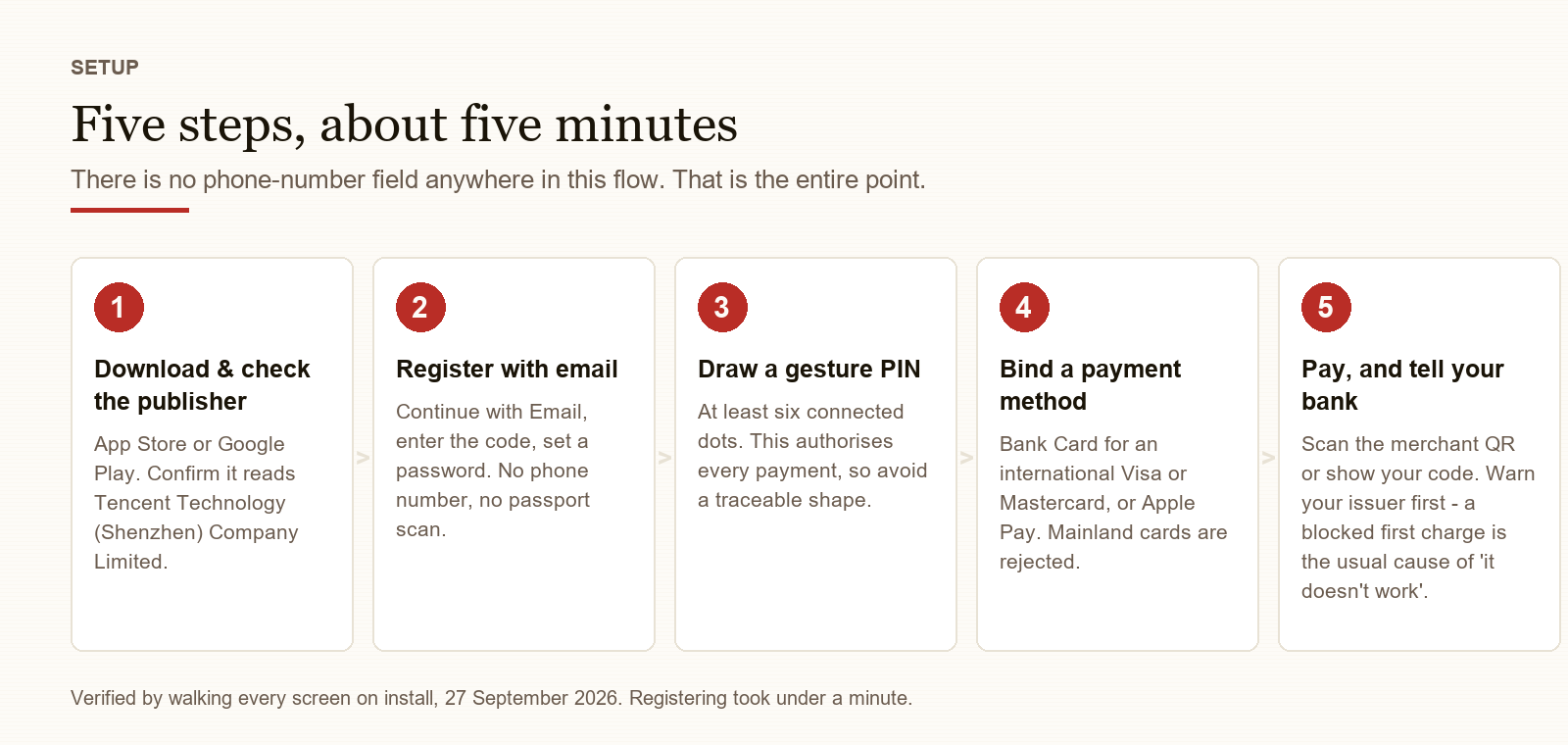
The whole flow, verified on a real install:
- Download TenPayGo from the App Store or Google Play. Check the publisher reads Tencent Technology (Shenzhen) Company Limited.
- Register by email.
Continue with Email→ your address → the emailed code → set a password. Identity requirements end there. There is no phone number box, and no passport KYC for basic use. - Draw a gesture PIN — at least six connected dots. This is your payment authorisation, so do not pick a pattern someone could copy by watching over your shoulder.
- Bind a payment method. On the Pay tab:
+under Bank Card for a card,+for Apple Pay, or pick from the E-Wallet list. - Pay. Scan the merchant’s QR, or show your own payment code for the cashier to scan.
What you can bind
International bank cards — seven networks: Visa, Mastercard, UnionPay International, American Express, JCB, Diners Club, Discover.
The card must be issued outside mainland China. Mainland-issued cards are not accepted, and neither are WeChat balance, Alipay balance or cash top-ups — anything that only exists inside China is out of scope by design.
Apple Pay — you can bind it and use it to authorise payments. Among Chinese wallets this is unusual, and it is the most privacy-friendly option if you would rather not hand your card number to a three-day-old app.
Overseas e-wallets — 34 at launch, with roughly 60 targeted by the end of 2026. A sample of the live list:
| Region | Wallets |
|---|---|
| South Korea | Naver Pay, KB Pay, KB Star Banking, Shinhan SOL Pay, Hana Pay, Hana Money, Hana OneQ, Moreta |
| Thailand | ShopeePay Thailand, Bangkok Bank, K PLUS |
| Singapore | ShopeePay Singapore, LiquidPay |
| Vietnam | MoMo, Zalopay |
| Hong Kong / Macau | Octopus, BoC Pay+, BOC Macau, Tap&Go |
| Cambodia / Laos | Bakong, BCEL One, LOCA Pay |
| Malaysia / Mongolia | Boost, Social Pay |
If your usual wallet is on that list, the flow is lighter than a card: the wallet handles the balance, TenPayGo handles the QR.
The fee picture
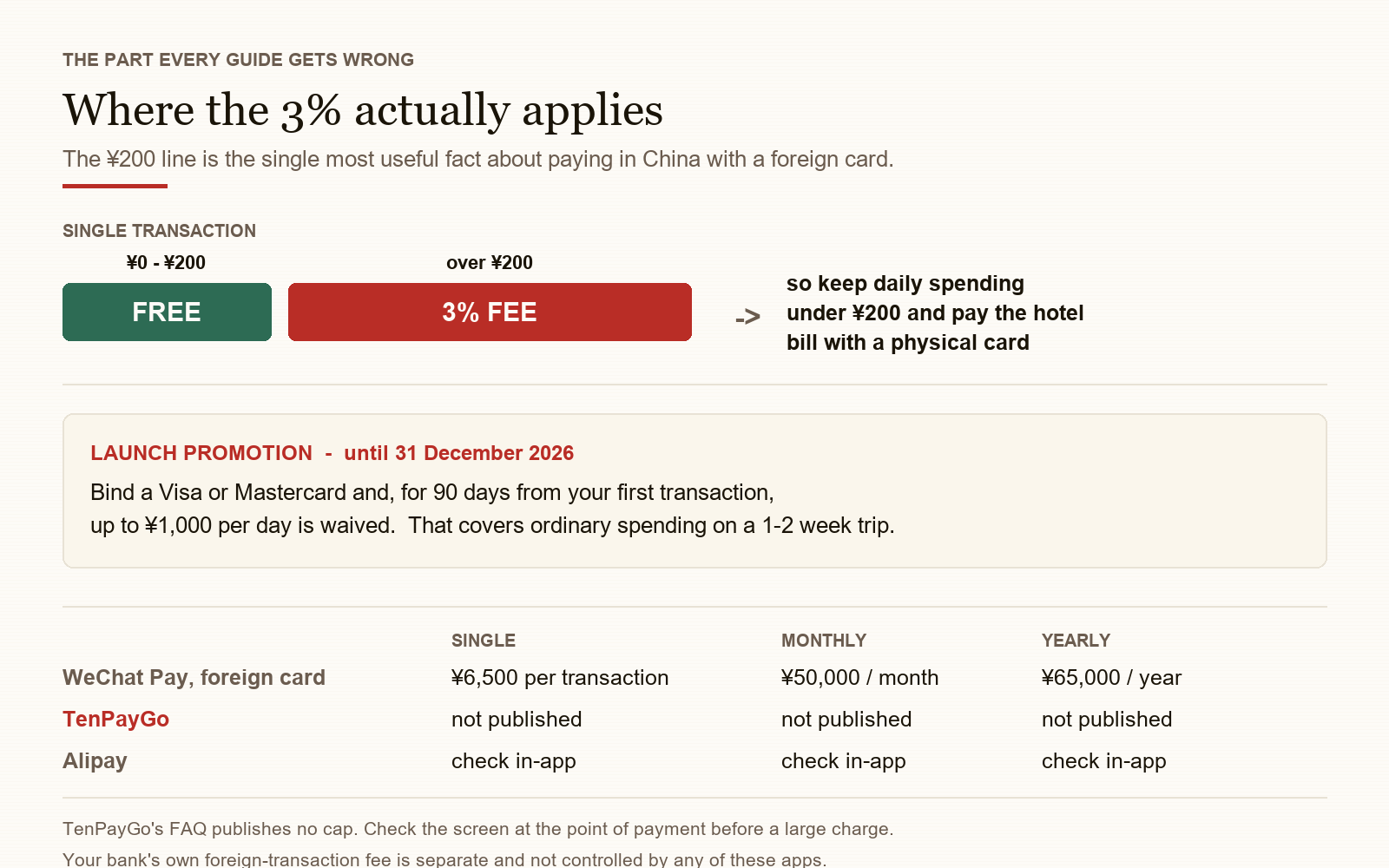
The published rate matches WeChat Pay’s standard foreign-card rate: free at or below ¥200, 3% above ¥200.
On top of that, Tencent is running a launch promotion: bind a Visa or Mastercard and, for 90 days from your first transaction, up to ¥1,000 per day is waived, running until 31 December 2026. On a one- or two-week trip your everyday spending would sit under that cap.
Two honest caveats. First, the fee line on your own confirmation screen is authoritative — the app shows a dedicated International Card Fee row before you approve, and we have seen reports that the sub-¥200 exemption is not always applied. Second, your bank’s own foreign-transaction or currency-conversion fee is separate and beyond the app’s control. Check your card’s terms.
One thing TenPayGo does not publish that our WeChat Pay guide does: a transaction cap. WeChat Pay’s documented limit is ¥6,500 per transaction and ¥50,000 per month. If a hotel deposit or a flight is on the line, check the screen at the point of payment rather than assuming.
Two features that are Shenzhen-only
The acceptance network is nationwide, but two of the convenience features are not:
- Shenzhen transit card — top up in-app, scan into the metro and buses. No phone number, no real-name verification. This is the single most genuinely useful thing in the app if your itinerary touches Shenzhen, and it is useless anywhere else.
- Duty-free tax refund — an in-app entry via ICBC’s Shenzhen branch. If you shop in Shenzhen before flying out, check it; otherwise you will still queue at the airport counter.
Tencent is headquartered in Shenzhen, and both partnerships are local. Treat them as pilots that may or may not travel.
The menu translator is the feature to actually use
We flagged the “I cannot read this menu” problem as one of the sharpest friction points in Chinese travel, and the obvious objection was that translation is a solved problem — Pleco, Baidu Translate, WeChat’s built-in scan. All three work; all three also require you to know they exist, and two of them are awkward to use mid-meal.
TenPayGo’s camera is the first of these to be in the app you already opened to pay, which is the whole point. Point it at a menu, and when it recognises one you get a tappable translated ordering list rather than a wall of text. The stated language coverage is the APEC economies.
The app carries an explicit disclaimer that AI output is advisory. That is the right posture: it is built for menus and taxis, not for a pharmacy counter or a police station.
Honest limitations
One timeline detail worth knowing, because it explains the rough edges: TenPayGo was listed in the App Store on 21 June 2026 in a limited beta. The current version at the time of writing is 1.1.2, dated 24 September — the public launch. So the app has been running for three months, but only for a few days in front of ordinary travellers. That is why the feature set is still filling in.
We tested it the same week, and the edges are visible:
- It is very new to the public. The App Store rating is 3.19 from 59 reviews. Expect fast UI changes and feature toggles — the Shenzhen-only flags are exactly the kind of thing that ships and un-ships.
- Code binding is not universal. Reports from early testers name Wise, HSBC and N26 cards as working and others intermittently failing. If binding fails, try another issuer before assuming the app is at fault.
- Merchant QR scanning is not yet flawless. Early testers report that scanning personal collection codes works inconsistently.
- Refunds are merchant-initiated. You cannot start one in the app. Agree it with the shop, they trigger it, the money returns to the original method. Your Transactions tab is the paper trail.
- Support is a real person, in China hours. In-app Support,
tenpaygo.support@tencent.com, or +86 571 95017, 09:00–21:30 China time.
The bottom line
For a first trip to China, TenPayGo is the most credible answer yet to the problem that stops people before they start: you do not have a Chinese phone number, and you do not want to build an identity around one just to buy a bowl of noodles. Email-only registration is the real unlock, and paying on the existing WeChat Pay network means the acceptance problem is already solved.
Treat it as a strong second option, not a sole one. Bring a card that works for larger amounts, keep a few hundred yuan in cash, and do not build a trip that depends on a three-day-old app being bug-free.
Getting help
- In-app:
Support→Send Feedback - Email:
tenpaygo.support@tencent.com - Hotline: +86 571 95017 (09:00–21:30 China time)
- Official site: tenpaygo.com
If you would rather set up the full accounts first, our WeChat Pay guide covers binding a foreign card inside WeChat, and How to pay in China compares all three options side by side.
Step by step
-
Download TenPayGo and check the publisher
Search 'TenPayGo' in the App Store or Google Play. Confirm the publisher is Tencent Technology (Shenzhen) Company Limited — impostor payment apps are a real and active category, and this one is very new.
-
Register with your email address
Tap Continue with Email, enter your address, type the verification code, then set a login password. That is the whole identity step. Note what is absent: no phone number field, no passport scan, no face check.
-
Draw a gesture PIN
Connect at least six dots. This pattern authorises every payment, so avoid anything a stranger could trace over your shoulder — a shape, a letter or a straight line are all worse than an irregular shape.
-
Bind a payment method
On the Pay tab, use + under Bank Card for an international Visa or Mastercard, or + under Apple Pay if you would rather not type your card in. The E-Wallet section lists the supported overseas wallets. Cards must be issued outside mainland China.
-
Pay at any WeChat Pay merchant
Either scan the merchant's QR code, or show your own payment code for the cashier to scan. Both work at any merchant displaying WeChat Pay — no merchant needs to opt in, and there is no foreigner mode to switch on. Check the International Card Fee line on the confirmation screen before you approve.
-
Tell your bank before you travel
A blocked first charge is the most common reason a foreign card 'does not work' in China. Notify your issuer that you are travelling to China so the first few transactions are not flagged as fraud.
FAQ
-
What is TenPayGo and who is it for?
TenPayGo is a standalone payment app built by the WeChat Pay team at Tencent, released on 24 September 2026. It is aimed at short-term foreign visitors who want to pay at Chinese merchants without setting up a full WeChat or Alipay account. It runs on the same merchant network as WeChat Pay, so any shop, restaurant, taxi or hotel that displays a WeChat Pay QR code will accept it. It is explicitly not for people living in China. -
Do I need a Chinese phone number to use TenPayGo?
No. That is the entire point of the app. You register with an email address, confirm a code, set a password and draw a gesture PIN. There is no Chinese mobile number field anywhere in the flow, and no passport or ID verification for basic use. That is a genuine departure from both WeChat Pay and Alipay, which both want a phone number before they will do anything. -
Do I need a WeChat account to use TenPayGo?
No. TenPayGo is a completely separate app. There is no chat, no Moments feed, no mini-programs and no social features. If you only need to pay — and you cannot be bothered to adopt a super-app for a two-week trip — that is exactly the trade it offers. -
Which cards can I bind to TenPayGo?
Cards from seven international networks: Visa, Mastercard, UnionPay International, American Express, JCB, Diners Club and Discover. The card must be issued outside mainland China — mainland-issued cards cannot be bound, and neither can WeChat balance, Alipay balance or cash top-ups. You can also bind Apple Pay directly, which is unusual among Chinese wallets and useful if you would rather not type your card number into a brand-new app. -
How much does TenPayGo cost?
The published rate matches WeChat Pay's standard foreign-card rate: free at or below ¥200 per transaction, 3% above ¥200. There is also a launch promotion — bind a Visa or Mastercard and, for 90 days from your first transaction, up to ¥1,000 per day is waived, running until 31 December 2026. Two caveats: the fee shown on your own confirmation screen is what counts, and your own bank may still charge a foreign-transaction or currency-conversion fee on top. TenPayGo's FAQ does not publish a transaction cap, unlike WeChat Pay's documented ¥6,500 per transaction. -
Can I use TenPayGo outside Shenzhen?
For paying, yes — the acceptance network is nationwide. But two convenience features are Shenzhen-only at launch: the built-in Shenzhen transit card (Shenzhen Metro and buses, no phone number or real-name verification needed) and the in-app duty-free tax refund, which is a partnership with ICBC's Shenzhen branch. Outside Shenzhen, take the transit card and tax refund off the feature list. -
Can TenPayGo translate menus and signs?
Yes, and this is the feature most likely to matter to you. The Go tab has an AI camera: point it at a menu or a street sign and it explains or translates what it sees, with support for the languages of the APEC economies. When it recognises a menu it can turn it into a tappable ordering list. There is also two-way spoken translation built for talking to drivers. The app carries an explicit disclaimer that AI results are advisory — fine for menus and taxis, not for medical or legal situations. -
Why should I not just use WeChat Pay or Alipay?
If you are staying more than a month, keep WeChat Pay and Alipay. TenPayGo cannot bind a mainland bank card, cannot hold a balance beyond the Shenzhen transit top-up, and has no person-to-person transfers — so it is a payment front-end, not an account. It is also very new: roughly 3.2 on the App Store from about 50 reviews, and the UI and feature toggles are still moving. Use it as the low-friction option alongside your existing setup, not as a replacement. -
How do refunds work in TenPayGo?
The merchant initiates the refund — you cannot start one in the app. Agree it with the shop, the merchant triggers it in their own system, and the money returns to the card or wallet you paid with. Your record of payments and refunds is in the app's Transactions tab, which is your proof if a dispute comes up. Timing depends on the merchant, the card network and your bank. -
Is TenPayGo safe and how do I get help?
It is a Tencent product, published by Tencent Technology (Shenzhen) Company Limited — check that name in the app store — and it runs on the same infrastructure as WeChat Pay. For support: in-app Support → Send Feedback, the Customer Support button in the user guide, tenpaygo.support@tencent.com, or the hotline on +86 571 95017, 09:00–21:30 China time.
Related guides
- Money & Payment
How to Pay in China 2026: Alipay, WeChat Pay, eSIM & DiDi for Foreigners
Complete setup guide for the 4 apps every foreigner needs in China: Alipay (scan-to-pay), WeChat Pay (¥3,000 limit), eSIM (data on landing), and DiDi (ride-hailing). With 240h visa-free transit and 30-day visa-free entry now covering 50+ countries, the 4-app setup is the new arrival checklist.
9min read
- Money & Payment
Alipay for Foreigners 2026: Setup with Visa/Mastercard
Step-by-step guide to setting up Alipay with a foreign Visa/Mastercard. Covers Tour Pass, $3,000 limit, $100 per transaction cap, and how to pay everywhere in China.
9min read
- Money & Payment
WeChat Pay for Foreigners 2026: Visa Setup, Limits & Fees
Can foreigners use WeChat Pay in China? Yes — bind a Visa/Mastercard in about 10 minutes. Limits: ¥6,000 per transaction, ¥50,000 monthly, 3% fee over ¥200.
8min read
- Money & Payment
Cash or Card in China 2026: The Hybrid Payment Reality Foreigners Miss (Plus the ATM 7% Trap)
China is NOT a fully cashless society for foreign visitors in 2026. 90% of urban merchants take Alipay/WeChat Pay, 60% of small vendors are cash-only, foreign Visa/Mastercard at terminals works at 60% of mid-range+ shops with 2.6-3.2% surcharge. **ATM withdrawals: the 4-layer fee structure is 6.75-12.75% total** (BOC flat + FX + DCC trap + out-of-network). The DCC (Dynamic Currency Conversion) trap is a 3-7% hidden markup the ATM operator pockets if you accept 'withdraw in USD' instead of CNY. Bank-by-bank fee table, the 8-step ATM playbook, and 4 FAQs that cover DCC, Apple Pay, and the cheapest way to get CNY cash in 2026.
6min read
- Money & Payment
Alipay Account Locked or Frozen in China 2026: How to Recover in 4 Steps
Your Alipay account is locked or frozen — what now? The 4-step recovery process for 2026: (1) identify the lock reason, (2) submit the right documents, (3) wait 22-56 hours, (4) prevention. Real recovery times from 12 documented cases. The 5 lock reasons ranked by frequency: large first transaction, risk-control flag, suspicious merchant, name mismatch, age verification. Plus the 4 prevention rules that prevent 90% of locks.
4min read
- Money & Payment
Do Credit Cards Work in China? 2026 Reality Check
Where Visa, Mastercard, and Amex work in China — and where they don't. Hotel chains, restaurants, airports, train stations, and the 3% fee you can avoid.
7min read