
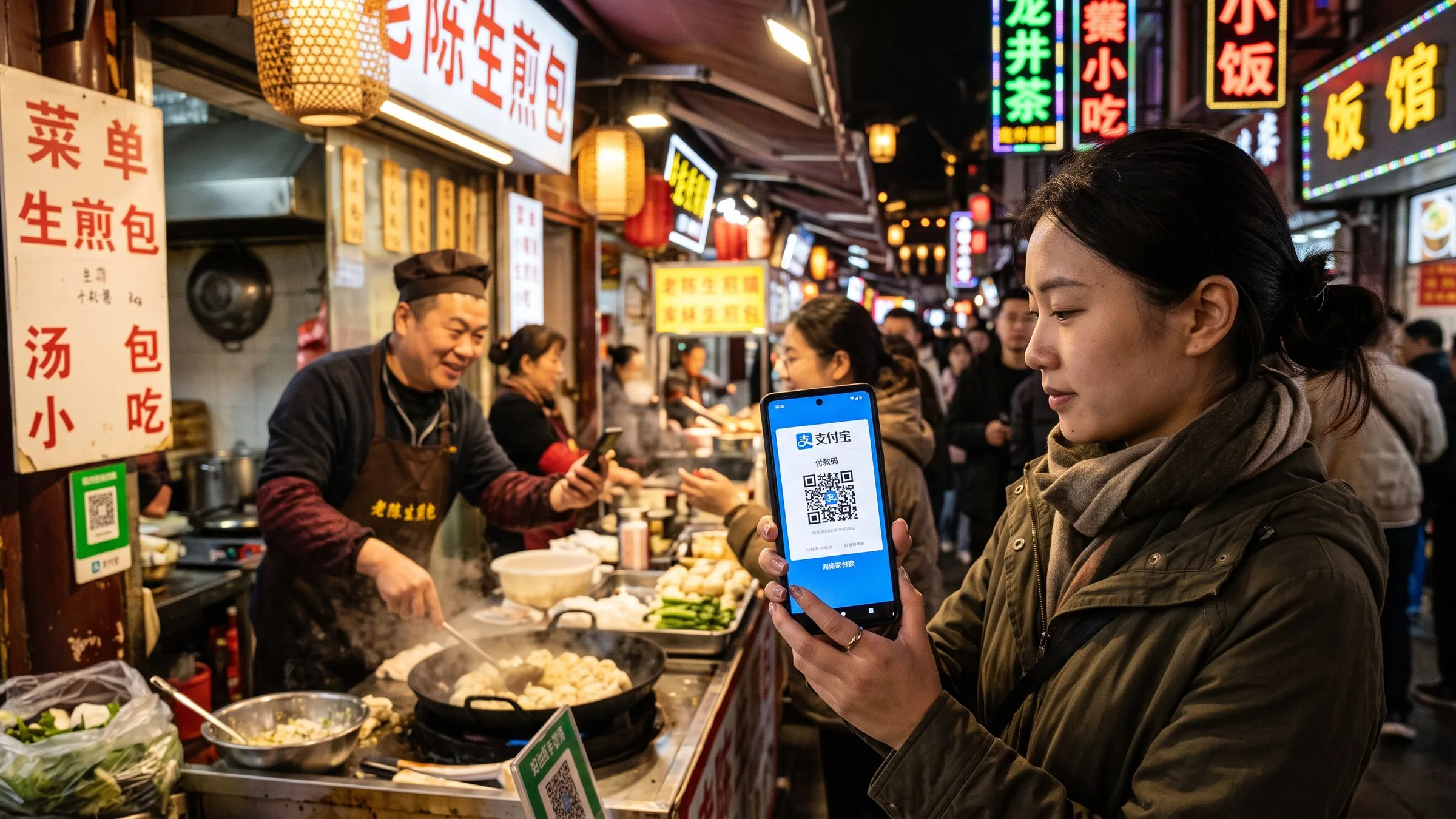
How to Pay in China 2026: Alipay, WeChat Pay, eSIM
Setup for the 4 apps every foreigner needs in China: Alipay, WeChat Pay, an eSIM for data on landing, and DiDi. Limits and 30-45 minutes.
You can pay almost anywhere in China with your phone in 2026. The catch: the 4 apps that make it work (Alipay, WeChat Pay, an eSIM, and DiDi) all need to be set up BEFORE you board the plane. Once you’re in the air, the in-flight WiFi is too slow for app downloads, the airport WiFi requires a Chinese phone number for SMS verification, and the moment you land your home SIM card will lose data. Set up the 4 apps 30-45 minutes before departure, test the eSIM at home, and you’ll walk off the plane at PEK/PVG/CAN with a phone that works like a local’s.
This guide covers the 4 apps in the order you should set them up, the exact button paths for each setup screen, the gotchas that take 3 hours to debug if you don’t know about them in advance, and the cash/card/POS backup strategies if anything fails. It also covers the 2026 visa-free rules (50+ countries now enter China without a visa for 30 days) since the 4-app setup is now the standard arrival checklist for every short-term visitor.
How to pay in China at a glance
If you only have 60 seconds, here is the short answer every foreign traveler actually searches for: the 4 essential apps are Alipay, WeChat Pay, an eSIM, and DiDi, all set up before your flight. Alipay and WeChat Pay together accept foreign Visa, Mastercard, JCB, Diners Club, Discover, and UnionPay International cards with no Chinese bank account needed — Alipay has a $100/transaction limit (¥3,000 for QR-scanned), WeChat Pay has a ¥3,000/transaction limit. Both apps work in 95% of Chinese transactions: restaurants, supermarkets, hotels, ride-hailing, attractions, even ¥3 produce stalls have a QR code. The remaining 5% (rural wet markets, some temples, emergency situations) — carry ¥200-500 cash as backup. For data, an Airalo or Holafly eSIM ($5-35 for 1-2 weeks) is the cheapest, most reliable option; pocket WiFi is the backup for older phones. For ride-hailing, DiDi is the local Uber and accepts the same foreign cards. The 2026 visa rules are friendly: UK, Korean, Japanese, Australian, NZ, and most EU passport holders enter China visa-free for 30 days (no application needed); US/Canadian couples need a $130 L-visa (4 working days). The 240-hour / 240-hour visa-free transit (10 days) is also available for any nationality at major ports with confirmed onward travel to a third country. Set up order: Alipay first (5 min), WeChat second (5 min), eSIM third (5-10 min, buy before flight), DiDi fourth (5 min). Total: 30-45 minutes, all done before you board. Skip the airport WiFi for app setup — too slow, requires Chinese phone number for SMS.
1. Alipay — the universal payment app
Alipay covers the most merchants in China. As of 2026, it accepts foreign Mastercard, Visa, JCB, Diners Club, Discover, and UnionPay International cards. Setup is 5 minutes: download the standard Alipay app (not AlipayHK), register with your foreign phone number, add your card under Me → Bank Cards. The catch: there’s a $0.01 verification charge that auto-refunds in 24 hours, and a $100 USD per-transaction limit when YOU scan a merchant’s QR code. For larger purchases, ask the merchant to scan YOUR QR code (under Me → Payment Code) — the limit jumps to ¥3,000 (~$420). For purchases above ¥3,000, use a major hotel or shopping mall credit-card POS directly.
The two gotchas that waste the most time: 1) downloading AlipayHK (Hong Kong version, doesn’t work for mainland China merchants — look for the orange “Alipay” app, not the green “AlipayHK”). 2) Trying to add a Maestro/Cirrus debit card — those don’t work in 2026, only the full Visa/MC/JCB credit or debit cards. For full setup details and the Alipay Tour Card backup option, see our Alipay for Foreigners 2026 guide.
2. WeChat Pay — the second universal payment app
WeChat Pay uses a different payment rail than Alipay and is more reliable at some smaller merchants (especially outside the top 20 cities). The setup is similar: download WeChat (not WeChat Work or any region-specific variant), register with your foreign phone number, go to Me → Services → Wallet, add your card. Per-transaction limit is ¥3,000 (~$420). WeChat also serves as the messaging app for your trip — add your hotel concierge, tour guide, and any Chinese friends before you land. Most hotels and tour operators communicate via WeChat.
The one important distinction: WeChat Pay’s $3,000 single-transaction limit is NOT a daily cap — it’s per transaction. You can do 10 transactions of ¥3,000 in a day if you want. The hidden gotcha: WeChat’s regional setting must be ‘China’ (not your home country) to enable Wallet. If you registered in another region first, you need to start over with a China-region install. For setup details, see our WeChat Pay for Foreigners guide.
3. eSIM — data on landing
The single biggest mistake foreign travelers make in China is relying on their home SIM card’s roaming. It works, but at $10-15/day, a 10-day trip costs $100-150 in data alone. The alternative: an eSIM from Airalo, Holafly, or Nomad, installed BEFORE you fly. Buy the eSIM (5 minutes), scan the QR code in your phone’s Cellular settings (2 minutes), and the eSIM activates the moment your phone detects a foreign network after landing. Three top options:
- Airalo ($5-9 for 2 weeks, 1-3 GB plans) — best UI, easiest setup, data-only, no voice/SMS. China local carrier: China Mobile.
- Holafly ($25-35 for 5-15 days, unlimited data) — pricier but no GB cap. Good for heavy data use. Data-only, no voice/SMS.
- Nomad ($5-12 for 1-5 GB plans) — middle ground. China local carrier: China Mobile or China Unicom.
For longer stays (1+ month) or heavy data use, the China Unicom international tourist eSIM sold at airport kiosks is ¥200/30 days for 30 GB — best $/GB. Avoid home carrier China roaming unless you have a generous plan. Pocket WiFi rental is the backup for older phones (pre-2018 iPhones, older Androids) that don’t support eSIM. For comparison of all 3 eSIMs, see our Best eSIM for China 2026 guide.
The activation gotcha: eSIMs activate on network detection, NOT on a timer. So if you buy at 8 PM the day before your flight, install the QR code at 8:30 PM, and your flight lands at 6 AM the next day, the eSIM is ready. The 5-15 day plan starts counting from the moment the eSIM first connects to a Chinese network.
4. DiDi — the local Uber
DiDi is China’s version of Uber and accepts the same foreign cards (via Alipay or WeChat Pay integration — direct foreign card linking has higher decline rates). Setup is 5 minutes: download the China-region DiDi app, register with your foreign phone number, set payment method to Alipay or WeChat Pay. The home screen shows your GPS location; tap ‘Where to?’ to enter a destination. DiDi supports English text input for destinations, but Chinese addresses work better. For airport pickup, select the airport terminal explicitly (e.g., ‘Beijing Capital T3’) rather than ‘Beijing airport’ to avoid confusion.
Three setup tips: 1) Set your hotel’s home address (Chinese characters) before your first DiDi ride — saves typing time. 2) Allow location services ‘Always’ for DiDi — required for driver pickup. 3) Pre-input your hotel’s address in Chinese characters by taking a screenshot of the hotel’s Baidu Maps listing (Baidu Maps has English UI but the Chinese address is the most accurate). For setup details and a list of 6 DiDi-specific gotchas, see our Using DiDi as a Foreigner guide.
Order to set up (30-45 minutes total, all before you board)
- Alipay first (5 min) — this is the universal payment app, sets the foundation
- WeChat second (5 min) — backup payment + messaging for hotel/tour comms
- eSIM third (5-10 min) — buy + install + test at home before you fly
- DiDi fourth (5 min) — only useful once you have a working data connection
Test the eSIM at home by turning it on (most phones: Settings → Cellular → turn on the China eSIM) for 5 minutes. It won’t have data (no Chinese network nearby) but you can verify the QR code scanned correctly and the eSIM is recognized by your phone. If it doesn’t show up in Settings, your phone might not support eSIM — fall back to pocket WiFi rental.
At the airport immigration counter, you only need Alipay open to scan the health declaration QR (still required as of 2026 in some ports — the QR is on the paper form you fill out on the plane). After clearing immigration, you have 3-4 hours of buffer time. Use this to: test Alipay at the airport convenience store (¥3-5 water bottle), take your first DiDi from the airport to the hotel, and get ¥200-500 cash from the Bank of China ATM in the arrivals hall (English menu, accepts Visa/MC/UnionPay).
Cash backup (yes, still useful)
Cash is backup, not primary. Alipay and WeChat Pay cover 95% of transactions — even ¥3 produce stalls at the local wet market have a QR code. Carry ¥200-500 in small bills (¥10, ¥20, ¥50) for: traditional wet markets in tier-3 cities, rural areas, some Buddhist temples (donation boxes are still cash), emergency situations if your phone dies, and tipping at some high-end restaurants (though tipping is not customary in China, ¥20-50 in cash for exceptional service is appreciated).
ATMs at major bank branches (Bank of China, ICBC, China Construction Bank, Agricultural Bank of China) accept foreign Visa/MC and UnionPay cards, with English menus. Better rates than airport currency exchange. Avoid the airport exchange counters — they typically give 3-5% worse rates than your bank’s no-FX-fee card at the ATM. For details on cash vs card strategy, see our China Cash vs Card guide.
Common gotchas that waste 3 hours to debug
-
Forgot the eSIM and tried to use airport WiFi — airport WiFi requires SMS verification to a Chinese phone number you don’t have yet. Result: 1+ hour stuck at the airport. Solution: install eSIM at home before flying.
-
Downloaded AlipayHK instead of Alipay — AlipayHK is the Hong Kong version, doesn’t work for mainland China merchants. The correct app is the orange “Alipay” icon, not the green “AlipayHK”. Look for the one with 500M+ downloads.
-
Tried to add a Maestro/Cirrus debit card to Alipay — only full Visa/MC/JCB credit or debit cards work in 2026. Maestro/Cirrus are not supported. If your bank only gives you a Maestro card, ask for a Visa/MC debit card instead.
-
DiDi shows no cars available — usually means the China-region DiDi app wasn’t installed (you installed the international ‘DiDi’ app instead). Uninstall and re-download the China-region DiDi from the China App Store or via this direct link.
-
Alipay showing ¥0 balance after binding card — your foreign card might require 3D Secure verification. Check your bank’s app for a verification prompt before retrying Alipay.
-
WeChat Pay showing ‘region not supported’ — your WeChat was registered in a non-China region. Need to re-register with the China-region WeChat (download WeChat in China mode, not WeChat Work or any regional variant).
-
Lost your phone mid-trip — Alipay and WeChat accounts are tied to your phone number. If you can receive the SMS on a new device, you can log in within minutes. If not, you have 24 hours before the original device is locked out (security measure). Take screenshots of your Alipay QR code + DiDi account as backups, save them to iCloud/Google Photos.
Book this setup (one-stop)
All 4 apps in this guide can be set up before you fly, and the eSIM + hotels + tour tickets can be pre-booked through these platforms. Click through to compare prices for your dates.
China eSIM from $5
The fastest China eSIM to set up. 1-3 GB plans from $5, 5-30 day options, instant activation on landing. China Mobile network. Data-only (no voice/SMS). Free trial on first eSIM.
1 GB / 7 days: $4.50 · 3 GB / 15 days: $9
Hotels, HSR, attraction tickets
China's biggest OTA, English interface, foreign cards accepted. Book hotels, high-speed trains, and attraction tickets in one cart. Often 10-30% cheaper than Booking.com for the same hotels in China.
Hotels from $35/night · HSR from $15
Unlimited data eSIM
Best for heavy data use (Google Maps, video calls, frequent uploads). Unlimited data plans from $25 for 5 days up to $35 for 15 days. 24/7 English support. China Unicom + China Mobile networks.
Unlimited / 5 days: $25 · 15 days: $35
Related guides
For the detailed setup of each app, see the full guides:
- Alipay for Foreigners 2026 — full setup walkthrough, Tour Card backup, $3,000 limit explained
- WeChat Pay for Foreigners — full setup, ¥3,000 limit, hotel concierge messaging
- Best eSIM for China 2026 — Airalo vs Holafly vs Nomad head-to-head
- Using DiDi as a Foreigner — DiDi-specific gotchas, airport pickup tips
- China Cash vs Card — when cash is still necessary
- China Visa Free 2026 — 50+ countries now visa-free for 30 days
- China Travel Budget 2026 — full cost breakdown for trip planning
- Build your own China trip — interactive planner
Build your own China arrival kit
Reading is fine — setup is better. This 4-app checklist is the new arrival ritual for every short-term China visitor. Do it before you board, walk off the plane with a working phone, and pay like a local for the next 1-30 days.
Step by step
-
Step 1: Download + register Alipay (5 min)
Download 'Alipay' (not AlipayHK) from the App Store or Google Play. Register with your foreign phone number — you'll get an SMS verification code, which may take 2-3 minutes to arrive (international SMS routing). Once registered, go to Me → Bank Cards → Add Card. Enter your Visa/MC/JCB/Diners/Discover card details. Alipay accepts Mastercard, Visa, JCB, Diners Club, Discover, and UnionPay International. You'll be charged a small $0.01 verification transaction that auto-refunds within 24h. Per-transaction limit is ~$100 USD; for larger purchases ask the vendor to scan YOUR QR code (¥3,000 limit). Setup complete.
-
Step 2: Download + register WeChat (5 min)
Download 'WeChat' (not WeChat Work or any region-specific variant). Register with your foreign phone number, then go to Me → Services → Wallet. Tap 'Add a card' and enter your Visa/MC details. WeChat Pay uses a different payment rail than Alipay and is more reliable at some smaller merchants. Per-transaction limit is ¥3,000 (~$420). Once set up, your WeChat QR code (in Me → My QR Code) can be scanned by any merchant in China. WeChat is also your messaging app for the trip — add your hotel concierge, tour guide, and any Chinese friends before you land.
-
Step 3: Buy + install an eSIM (5-10 min, before flight)
Three top options depending on data needs. Airalo: $5-9 for 2 weeks, 1-3 GB plans, best UI. Holafly: $25-35 for 5-15 days, unlimited data, pricier but no GB cap. Nomad: $5-12, 1-5 GB plans, middle ground. Buy the eSIM before you fly — they email a QR code that you scan in your phone's Cellular settings (eSIM activation triggers when your phone detects a foreign network, not on a timer). Test the eSIM at home before you leave (some phones don't support eSIM — iPhone XS and later, Pixel 3 and later, Galaxy S20 and later; older phones need pocket WiFi instead). For longer stays (1+ month) or heavy data use, look at China Unicom's international tourist eSIM sold at airport kiosks (~¥200/30 days, 30 GB).
-
Step 4: Download + register DiDi China (5 min)
Download 'DiDi' (the China-region app — the international 'DiDi' app is a different brand and won't find local cars in China). Register with your foreign phone number. Verification SMS may take 2-3 minutes on first attempt. Once registered, set payment method to Alipay or WeChat Pay (not direct foreign card, which has higher decline rates). The home screen will show your GPS location; tap 'Where to?' to enter a destination. DiDi supports English text input for destinations, but Chinese addresses work better. Set your home address (hotel name + Chinese characters) before you leave the hotel for the first time. For airport pickup, select the airport terminal explicitly (e.g., 'Beijing Capital T3') rather than 'Beijing airport' to avoid confusion.
-
Step 5: Set up at the airport (15 min after landing)
After clearing immigration and customs, you have 3-4 hours of buffer time. Use this to: 1) Turn on eSIM (or insert pocket WiFi) — your home SIM will lose data the moment you land, and airport WiFi requires Chinese phone number for SMS verification. 2) Test Alipay at the airport convenience store or vending machine — buy a bottle of water for ¥3-5 to confirm scan-to-pay works. 3) Take your first DiDi from the airport to the hotel (pre-input hotel name in Chinese). 4) Save your hotel's address in Chinese characters in WeChat (take screenshot of the hotel's Baidu Maps listing — Baidu Maps has English UI but the address is most accurate in Chinese characters). 5) Cash backup: ¥200-500 from the airport Bank of China ATM (English menu available, accepts Visa/MC/UnionPay).
FAQ
-
Can I use Alipay and WeChat Pay with a foreign Visa or Mastercard?
Yes. As of 2026, both apps accept Mastercard, Visa, JCB, Diners Club, Discover, and UnionPay International cards for direct binding. Download Alipay (international version, search 'Alipay' in your App Store — do not use AlipayHK) and register with your foreign phone number, then add your card under Me → Bank Cards. WeChat Pay requires the China-region WeChat app; same setup flow. Alipay Tour Pass is no longer required for most cards — the standard Alipay app works. Per-transaction limit on Alipay is ~$100 USD; for larger purchases ask the vendor to scan YOUR QR code ($3,000 limit). WeChat Pay single transaction limit is ¥3,000 (~$420). For purchases above these limits, use a major hotel or shopping mall credit-card POS. -
Do I need a VPN to set up Alipay and WeChat Pay before arriving in China?
No. The setup flow works fine on international internet. Download both apps BEFORE your flight, register with your foreign phone number (you'll get an SMS verification code that may be slow on Chinese mobile networks if you wait until landing), and bind your Visa/MC under Bank Cards. The setup takes about 5 minutes per app. Once you land, switch to your eSIM or pocket WiFi for the actual app usage — Alipay and WeChat Pay work fine on China mobile data without VPN. -
Is cash still useful in China in 2026?
Yes, but only as backup. Alipay and WeChat Pay cover 95% of transactions: restaurants, supermarkets, ride-hailing, hotels, attractions, even street vendors (almost all have a QR code even at ¥3 produce stalls). Cash (¥100-¥200 in small bills) is useful for: traditional wet markets in tier-3 cities, rural areas, some Buddhist temples (donation boxes are still cash), and as emergency backup if your phone dies. ATMs at major bank branches (Bank of China, ICBC, China Construction Bank) accept foreign Visa/MC and UnionPay cards, with English menus. Airport currency exchange counters give worse rates — use your bank's no-FX-fee card at the ATM instead. -
What is the best eSIM for China in 2026?
Three strong options depending on your data needs: Airalo (best UI, ~$5-9 for 2 weeks, 1-3 GB plans, data-only, no voice/SMS), Holafly (unlimited data, $25-35 for 5-15 days, data-only, pricier but no GB cap), and Nomad (middle ground, $5-12, 1-5 GB plans). All three work the moment you land. Buy and install BEFORE you fly — eSIMs activate when your phone detects the foreign network, not on a timer. For longer stays (1+ month) or heavy data use, look at China Unicom's international tourist eSIM sold at airport kiosks (~¥200/30 days, 30 GB). Avoid your home carrier's China roaming unless you have a generous plan — it's typically $10-15/day. -
Can I use DiDi without a Chinese phone number?
Yes. DiDi accepts foreign phone numbers for registration (verification SMS may be slow on first attempt — wait 2-3 minutes for the code). Once registered, you can use the app to call rides in any Chinese city. Payment integration: DiDi accepts Alipay, WeChat Pay, and international Visa/MC inside the app. The China-region DiDi app is the only one that works in China — the international 'DiDi' app is a separate brand for other markets and won't find local cars. Set up DiDi before you land or it can take 20+ minutes on airport WiFi. -
Do I need a Chinese bank account to use these apps?
No. All four apps (Alipay, WeChat Pay, DiDi, and eSIM apps) work with foreign Visa/MC/JCB cards. You never need a Chinese bank account as a tourist. The only places that might require a Chinese bank account: long-term apartment rentals, certain mutual fund investments, and some local utility bill payments — none relevant to a 1-3 month tourist stay. The '¥3,000/day outgoing limit' on Alipay applies to your foreign card balance, not a Chinese bank balance; you can top up additional foreign cards to extend the limit. -
What is the order to set up these 4 apps?
The fastest order, 30-45 minutes total, all done before you board the flight: 1) Download + register Alipay (5 min, add Visa/MC under Bank Cards). 2) Download + register WeChat (5 min, scan your QR code from your phone's screen during the registration, add Visa/MC under Me → Services → Wallet). 3) Buy + install eSIM (5-10 min, Airalo or Holafly — they email a QR code, scan it in your phone's Cellular settings). 4) Download + register DiDi China (5 min, same foreign phone number). At the airport immigration counter, you only need Alipay open to scan your health declaration QR (still required as of 2026 in some ports). -
What happens if my phone gets lost or breaks in China?
Three backup strategies, in order of reliability: 1) Cloud backup of your phone (Alipay and WeChat accounts are tied to your foreign phone number — if you can receive the SMS on a new device, you can log in within minutes). 2) Take screenshots of your Alipay Tour Card QR code + DiDi account — saved in iCloud/Google Photos, accessible from any new device. 3) Carry a printed copy of your hotel's address in Chinese characters + your passport — for emergency DiDi rides in areas with poor English support, the driver can navigate to the Chinese address. 4) $200 cash in small bills as ultimate backup. Note: if you replace your phone mid-trip, you MUST log back into Alipay and WeChat within 24 hours on the new device, or the original device will be locked out — both apps allow only 1 active device for security.
Related guides
- Money & Payment
TenPayGo Review 2026: WeChat Pay Without a Phone Number
TenPayGo is WeChat Pay's standalone app for foreign visitors — email signup, no Chinese number, no WeChat account. Our hands-on review.
11min read
- Money & Payment
Alipay for Foreigners 2026: Setup with Visa/Mastercard
Set up Alipay with a foreign Visa or Mastercard in 2026: Tour Pass, the $3,000 annual limit, the $100 per-transaction cap and paying anywhere.
9min read
- Money & Payment
WeChat Pay for Foreigners 2026: Visa Setup, Limits & Fees
Can foreigners use WeChat Pay in China? Yes — bind a Visa or Mastercard in 10 minutes. Limits: ¥6,000 per transaction, ¥50,000 monthly, 3% fee over ¥200.
8min read
- Money & Payment
Cash or Card in China 2026: Fees, Limits & Traps
China is hybrid, not cashless: Alipay/WeChat work at 90% of urban merchants, foreign cards at ~60% of mid-range shops plus 2.6-3.2%, ATM fees 6.75-12.75%.
6min read
- Stays & Hotels
Medical Tourism to China 2026: Costs, Hospitals, Visas
China treats 1.5M+ foreign patients a year, 50-70% cheaper than the US. There is no 'medical visa' — you apply under the S visa, S2 under 180 days.
18min read
- Itineraries
China Travel Guide 2026: Complete A-Z for Foreign Visitors
China travel guide 2026: 30-day visa-free entry, 240h transit, Alipay and WeChat Pay setup, DiDi, high-speed rail and hotel booking for first-timers.
25min read