
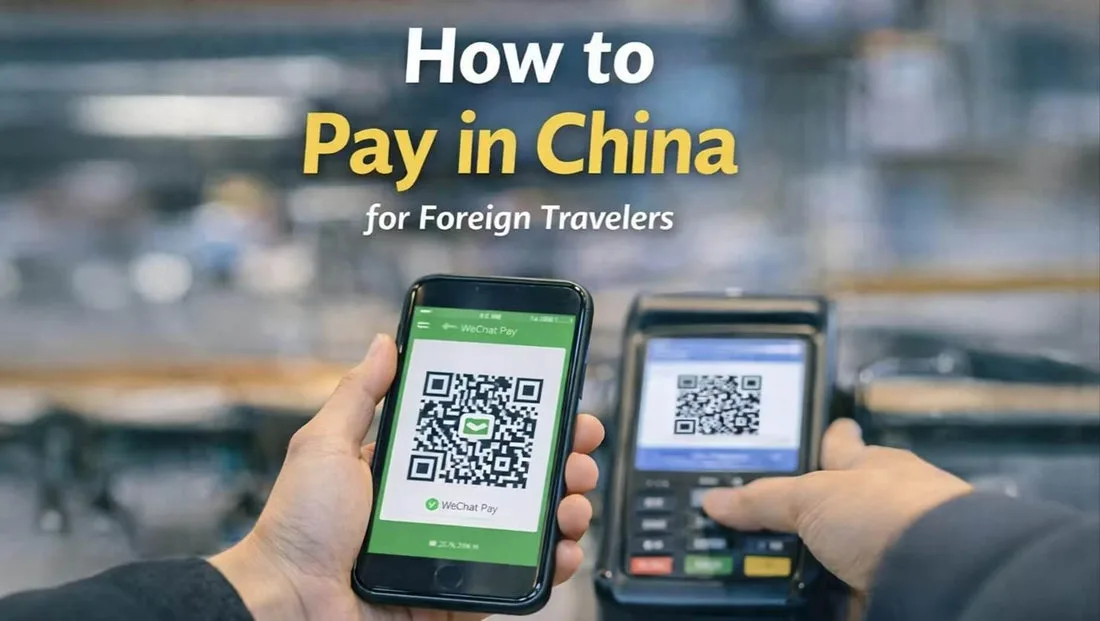
WeChat Pay for Foreigners 2026: Visa Setup, Limits & Fees
Can foreigners use WeChat Pay in China? Yes — bind a Visa/Mastercard in about 10 minutes. Limits: ¥6,000 per transaction, ¥50,000 monthly, 3% fee over ¥200.
WeChat Pay (微信支付, wēixìn zhīfù) is the second of China’s two essential mobile payment apps, and setting it up with a foreign Visa or Mastercard takes about 10 minutes. The catch: there are real transaction limits (¥6,000 per transaction, ¥50,000 monthly) and a 3% fee on transactions over ¥200 unless you qualify for one of the periodic fee-waiver promos. As of 2026, WeChat Pay accepts cards from Visa, Mastercard, JCB, Diners Club, Discover, and UnionPay International — but not all merchants will accept all card types.
This guide covers the actual setup, the genuine limits you need to know, and the fee structure that catches most foreigners off-guard.
New since 24 September 2026: if you do not have a Chinese phone number and do not want to deal with WeChat’s registration and risk control at all, WeChat Pay now also runs a standalone app called TenPayGo — email-only signup, no WeChat account, and it pays at exactly the same merchants. It is the fastest on-ramp we have seen. Our TenPayGo review covers what works, what is Shenzhen-only, and where it is still rough. The guide below is still the right one if you will be here for more than a few weeks.
Why bother with WeChat Pay if you already have Alipay
Three real reasons:
- Vendor coverage. Alipay and WeChat Pay have roughly equal merchant coverage in major cities, but rural areas, smaller vendors, and some older shops only display WeChat QR codes. About 5–10% of the time, WeChat is the only option that works.
- Chat + payment in one app. You’ll likely use WeChat to message hotels, tour guides, and locals anyway. Having payment built in means fewer app switches.
- Person-to-person transfers between friends are smoother in WeChat. Splitting a bill with a Chinese friend, paying back a tour guide, or sending a tip is easier.
The downside: WeChat Pay’s foreigner onboarding is slightly clunkier than Alipay’s, and the risk control is stricter — you may hit temporary holds if you bind and immediately try a large transaction. Alipay setup details at Alipay for foreigners.
WeChat Pay vs Alipay for foreigners (2026 side-by-side)
For most foreign travelers in China, the choice is “set up both, use Alipay by default, use WeChat Pay as backup” — here’s why:
| Dimension | Alipay (支付宝) | WeChat Pay (微信支付) |
|---|---|---|
| Foreigner onboarding ease | Easier — accept Visa/Mastercard directly, instant card binding, English UI in international app | Clunkier — 3% fee on transactions over ¥200, more risk-control holds, longer real-name verification |
| Single-transaction cap (foreign card) | $3,000 (¥20,000) | $830 (¥6,000) |
| Monthly cap (foreign card) | $6,900 (¥50,000) | $6,900 (¥50,000) |
| Transaction fee (foreign card) | None | 3% over ¥200 (fee-waiver promos run periodically) |
| Merchant coverage in major cities | 95% | 95% |
| Merchant coverage in rural / smaller cities | 80-90% | 85-95% (WeChat slightly better in smaller towns) |
| Peer-to-peer transfer | Limited (recent 2024-2025 addition) | Native — split bills, send to friends |
| Used for messaging | No | Yes — 1.3 billion Chinese users, you’ll need WeChat for hotels/guides anyway |
| English app version | Yes — Alipay international | Partial — some English, often falls back to Chinese |
| Refund / dispute resolution | Better for foreigners | Slower, less foreigner-friendly |
| 2026 market share in China | 53% | 41% (rest is UnionPay, cash) |
The 5-second rule: when both work, Alipay is faster (0.5-1s scan-to-pay), WeChat Pay is slower (1-2s). For an authentic experience, set up both before you fly.
The 10-minute setup
Step 1: Install WeChat and verify your account
Download WeChat from the App Store or Google Play. Register with your foreign phone number. The app sends a 6-digit verification code via SMS. You can also register via email if SMS isn’t working.
To unlock payment features, you must complete real-name verification:
- Go to Me → Settings → General → Manage Real-Name Verification (or Me → Services → Wallet → … → Real-Name Verification)
- Enter your passport details exactly as printed
- Take a selfie and submit
- Wait 1–24 hours for approval (usually within minutes)
Without real-name verification, you can use WeChat for messaging but the payment features stay locked.
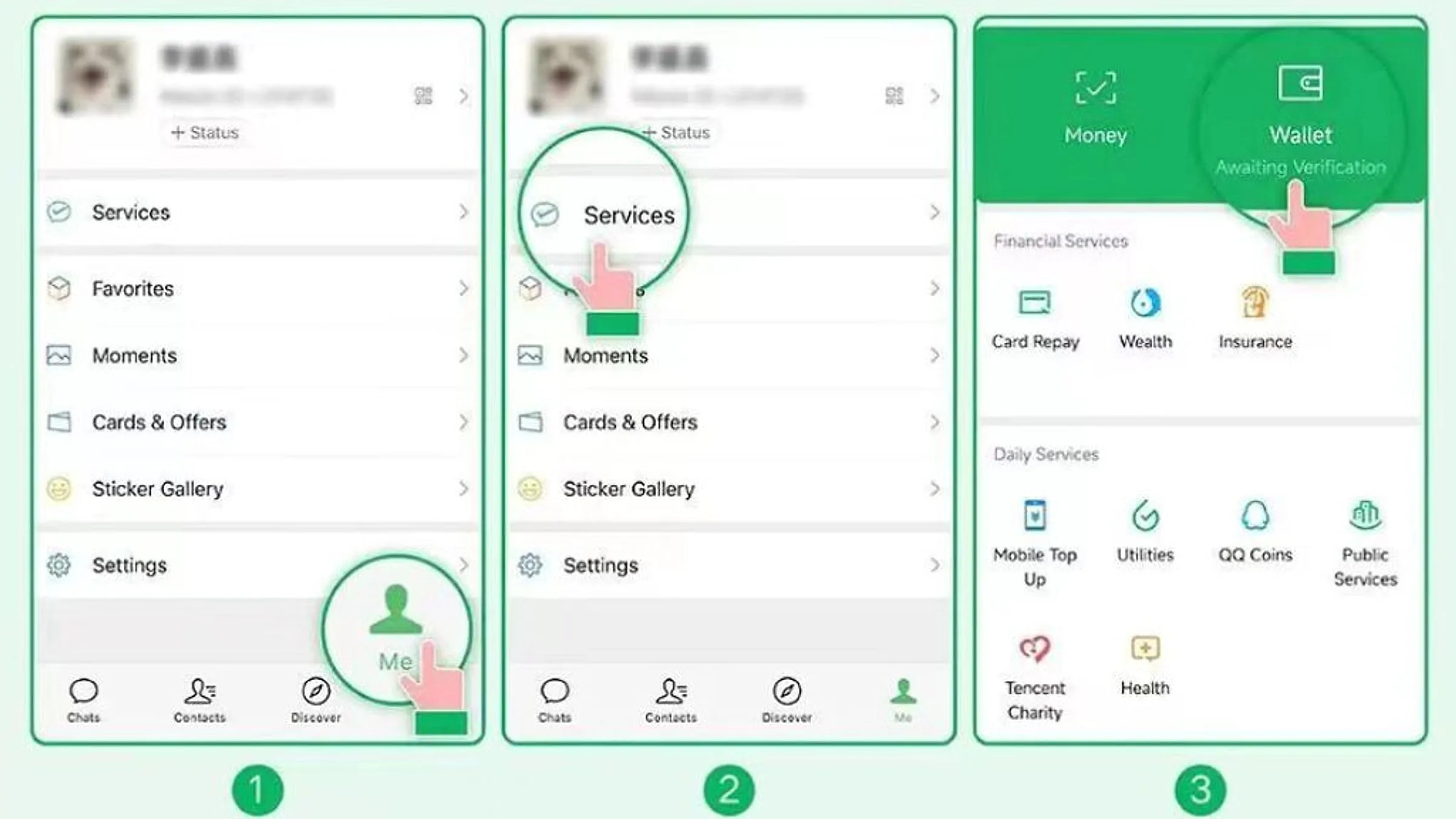
Step 2: Open the Wallet and add a card
- Tap Me → Services → Wallet → Bank Cards → Add a Bank Card
- Enter your card number, expiration, CVV
- Select card type (Visa, Mastercard, etc.) and issuing bank
- Fill in your name and address as on the card
- WeChat sends an SMS code to verify
WeChat places a small authorization hold ($0.05 USD) to confirm the card is valid. The hold releases in 1–3 business days.
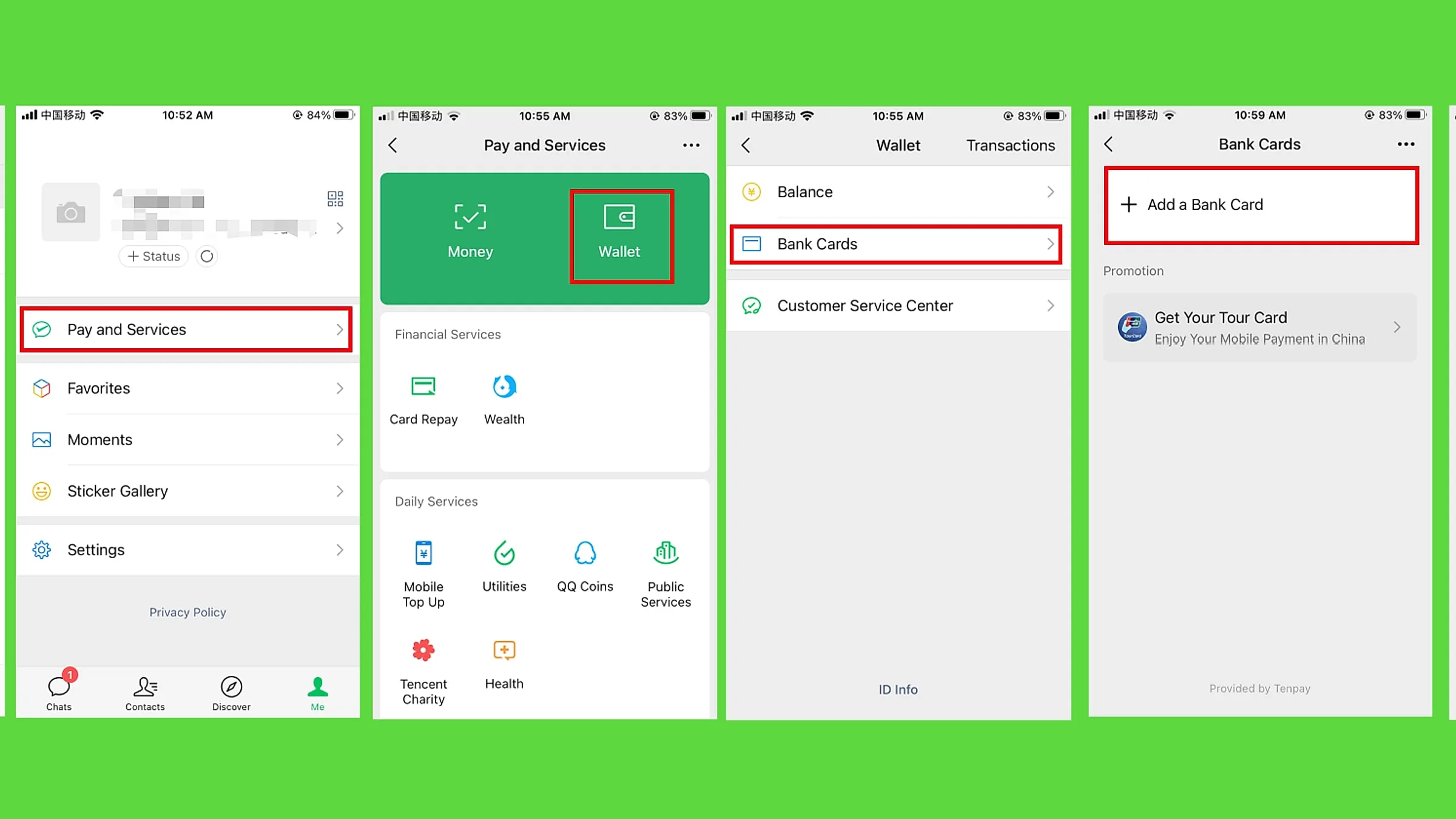
Verified: “International cards can be used for everyday transactions in mainland China by scanning a QR code to pay or presenting your payment code, or for in-app payments for things like e-commerce, food delivery and ride-hailing.” — Sohu, citing WeChat Pay official guidance, accessed 2026-07-24
Step 3: Set a 6-digit payment password
After binding, WeChat prompts you to create a 6-digit payment password. You’ll enter this for every transaction above a small threshold (¥50–200 depending on the merchant). Don’t lose it — without it, you can’t pay.
You can also enable fingerprint or Face ID in place of the password if your phone supports it.
Step 4: Make a small test transaction
Before you depend on WeChat Pay at a restaurant or train station, test it. Buy a bottle of water at a 7-Eleven, or send ¥1 to a friend. This:
- Verifies the card is working end-to-end
- Triggers the merchant to appear in your transaction history
- Activates higher transaction limits (WeChat gradually raises limits for accounts that show normal usage patterns)
If the test fails, the most common reason is your card doesn’t support 3-D Secure for international online transactions. Call your bank to enable it.
Transaction limits: the real numbers
These are the limits as of 2026, based on WeChat Pay’s published rules:
| Transaction type | Limit |
|---|---|
| Single transaction | ¥6,000 (~$840) |
| Monthly cumulative | ¥50,000 (~$7,000) |
| Annual cumulative | ¥60,000 (~$8,400) |
| Person-to-person transfer | ¥50,000 per day |
| Quick Pay (scan QR) | ¥3,000 per transaction, ¥5,000 per day |
Source: China Briefing payment FAQ and WeChat Pay user reports on Zhihu.
WeChat’s risk control can also impose a personal transaction limit lower than the published max if your account is new, your card is from a country WeChat considers high-risk, or you’ve made several failed attempts. To raise your limit:
- Use the app consistently for 1–2 weeks (small daily transactions)
- Bind additional cards
- Complete more profile fields (passport, address)
- Avoid rapid-fire transactions
Transaction fees: the 200 RMB rule and 2026 waivers
Here’s the part most guides get wrong. WeChat Pay’s fee structure is:
- Transactions of ¥200 (~$28) or less: 0% fee. Free.
- Transactions above ¥200: 3% transaction fee.
- Person-to-person transfers: Different fee structure based on withdrawal method; usually 0.1% per transfer.
So a ¥300 transaction costs you ¥309 (3% of ¥300 = ¥9 fee). A ¥2,000 transaction costs you ¥2,060.
As of mid-2026, WeChat Pay is running an APEC promotional waiver:
- First-time card binders: 90 days of fee-free transactions up to ¥1,000 per day per transaction
- All users: 0% fee on transactions of ¥200 or less, indefinitely
Source: Sohu / WeChat Pay official announcement, July 2026.
The 3% fee is still steep compared to domestic Chinese users (who pay 0% on standard QR payments) but is in line with what Western card networks charge for international transactions. If you have a no-foreign-transaction-fee credit card, you can offset some of this.
Practical tips from real users
Avoid big single transactions
If you need to pay ¥10,000 for a hotel, the 3% fee is ¥300. Either:
- Pay the hotel via Trip.com or Booking.com using your card directly (no WeChat fee)
- Split into multiple smaller payments (within the ¥50,000 monthly cap)
- Use Alipay instead (their fee structure is different and sometimes lower)
Use WeChat for chat + occasional small payments
WeChat is the wrong tool for a ¥5,000 single payment. It’s the right tool for:
- ¥10 dumpling at a street stall (free, fast)
- ¥80 taxi via a friend’s QR code scan
- ¥200 pharmacy purchase
- ¥500 attraction ticket at the gate
For bigger purchases, use your credit card directly through an international platform like Trip.com, Klook, or Booking.com.
Don’t use WeChat for cashing out
WeChat Pay forbids converting balance to cash through third-party “agents” who offer to swap your WeChat balance for RMB at a discount. These are scams or illegal money transmitters. If you ever top up your WeChat balance (for example, when sending a red packet), spend it on WeChat, don’t try to extract it.
If you get the dreaded “card risk” lock
WeChat’s risk control sometimes freezes transactions on newly bound international cards. To unfreeze:
- Open WeChat → Me → Services → Wallet → … → Help
- Search “transaction failed” or “card restricted”
- Submit an appeal with: passport photo, card photo (front only, mask middle digits), and a brief explanation
- Wait 1–3 business days for review
Most cases resolve within 24 hours. If WeChat denies your appeal, try a different card or contact WeChat support through the in-app chat (English is available).
Account freeze and full risk control: what to do when WeChat locks you out
Beyond the per-transaction “card risk” lock, WeChat has a deeper account-level freeze that can lock you out of messaging, payments, or both. This is rare but happens to 3-5% of foreign users within their first month. The 3 main causes:
- “Unusual login” detection: WeChat flags logins from new devices, new SIM cards, or new countries. If you log in from a different phone or travel to a new city, the system may freeze the account pending identity re-verification. Common for travelers who switch between phone and tablet, or who land in China on a different IP than their home country.
- “Mass messaging” or “spam-like behavior”: forwarding the same message to 20+ people, joining 10+ group chats in a day, or sending the same QR code to many contacts. WeChat treats this as promotional behavior and locks the account for 24-72 hours.
- “Linked card volume” trigger: binding 3+ foreign cards in a short time, or making 50+ small transactions in a day. This looks like money-laundering to the system.
How to recover a fully locked WeChat account
Step 1 — Try the in-app un-lock first. Open WeChat → tap “Account locked” → “Un-lock via friend verification”. The app will ask you to send a code via SMS to 2-3 of your WeChat contacts. The contacts reply with the code, and your account unlocks in 1-2 hours. This is the fastest path for the “unusual login” case.
Step 2 — If friend verification fails, escalate to WeChat Support. In the app: Me → Settings → Help & Feedback → Account Issues → “My account is locked and I can’t unlock it”. The form requires:
- Passport photo (color, full page)
- A short video selfie holding the passport (this is the most important step — the video is reviewed by a human within 1-3 business days)
- A brief explanation in English or Chinese: when the lock happened, what you were doing when it happened, and which of the 3 causes you think triggered it
- Your current phone number and email
Step 3 — If the in-app support doesn’t respond within 5 business days, escalate to Tencent’s international customer service: support@wechat.com (English, 5-7 day response time). Include the case number from step 2.
Worst-case timeline: 1-3 weeks for full account recovery if the case is escalated to manual review. The video selfie is the bottleneck — some users have had to resubmit 2-3 times before the video is accepted.
How to avoid a WeChat account freeze
The 3 prevention steps that cut the risk by 80%:
- Log in from the same device for at least the first 30 days. Do not switch phones or reinstall the app during this period. The “unusual login” detection looks at device fingerprint + IP together.
- Set a strong password and bind a recovery email + phone number before you fly. This makes the friend-verification unlock much faster if it does trigger.
- Do not bind more than 2 foreign cards in the first 90 days. The “linked card volume” trigger is a hard limit at 3 cards in a 90-day window for new accounts.
If you need a second WeChat account (some travelers do, one for personal chat and one for business or local contacts), use a different phone number and a different email. Tencent’s anti-fraud system links WeChat accounts by passport number, so a second account on the same passport is the highest-risk setup.
Backup communication if WeChat is locked
During the 1-3 week recovery window, you need a backup for messaging Chinese contacts (hotels, tour guides, restaurants). The 3 most reliable backups:
- Alipay’s built-in chat (支付宝聊天): same contacts, different platform. Most Chinese businesses accept Alipay messages.
- Apple iMessage: works in China for iPhone users, no VPN needed.
- Email + WhatsApp: most tour guides and hotels have an email or international WhatsApp; ask for it when you book.
Comparison: WeChat Pay vs Alipay for foreigners
| Feature | WeChat Pay | Alipay |
|---|---|---|
| Setup time | 10 min | 5 min |
| Card binding success rate | ~80% (depending on bank) | ~85% |
| Single transaction limit | ¥6,000 | $1,000–$3,000 (varies) |
| Monthly limit | ¥50,000 | $50,000 |
| Fee on >¥200 transactions | 3% | Variable, often 0% |
| Merchant coverage | ~95% | ~95% |
| Built-in translation | Yes (chat only) | Yes (camera + text) |
| Tourist mini-programs | Limited | Extensive |
| Person-to-person transfer | Smooth | Possible |
| DiDi integration | Via app | Via Alipay mini-program |
| Hotel/flight booking | Limited | Strong |
Source: aggregated from Sohu 2024 international card setup guide and user reports.
If you have to pick one, Alipay is slightly easier for first-time foreign users. But for maximum coverage, set up both. The 10 minutes it takes to set up WeChat Pay is cheap insurance for the one time you encounter a vendor that only displays a WeChat QR code.
When to use what
- Coffee, street food, taxi, convenience store: Alipay or WeChat, either works
- Hotel, flight, train: Use Booking.com, Trip.com, or 12306 directly with your credit card — no mobile payment fees
- Friend splitting the bill: WeChat (red packet or transfer)
- Buying something from a Taobao vendor: Alipay (better refund process)
- Person-to-person gift or tip: WeChat red packet
- Big single purchase (¥5,000+): Avoid WeChat’s 3% fee; use credit card through an international platform
For other payment methods and cash strategy, see How much cash to bring to China and Do credit cards work in China?. Both round out the payment picture so you have redundant options when the mobile apps inevitably hiccup.
Where to book
WeChat Pay works alongside Alipay. After setup, try it on:
- Find Beijing hotels — both Alipay and WeChat Pay accepted
- WeChat download (for WeChat Pay) — you’ll need this anyway for messaging in China
Affiliate disclosure: Some links above are affiliate links. We may earn a commission at no extra cost to you. See our Affiliate Disclosure for details.
Plan your trip — verified tools
These free tools are built on real, monthly-verified data and help you skip the trial-and-error phase of China trip planning:
- China 6-City 5-Day Budget Calculator — Real 2026 prices for 5 days in Beijing, Shanghai, Guangzhou, Chengdu, Xi’an, or Hangzhou. Budget / mid-range / comfort tiers, broken down line by line.
- China OTA Comparison 2026 — Trip.com vs Booking.com vs Agoda vs Klook across 5 booking types. Inventory, pricing, foreign card support, English service, per-OTA verdict.
Verified August 2026 by TravelHubChina Editorial. We re-check prices and policy details monthly so the data doesn’t drift.
Step by step
-
Install WeChat and complete account setup
Download WeChat from your app store, register with your phone number, and complete the basic identity verification (name + passport number). WeChat is the underlying messaging app for 1.3 billion Chinese users, so the same account works for Pay.
-
Open Me → Services → Wallet → Bank Cards
If you do not see "Services", tap Me first, then look for the row of icons below your WeChat ID. Wallet is the top-left card-style icon.
-
Tap Add Card and enter your international card details
WeChat Pay accepts Visa, Mastercard, JCB, Diners Club, Discover, and UnionPay International. Card verification is instant — the app sends a 6-digit SMS code to your phone.
-
Set a 6-digit payment PIN
Go to Me → Services → Wallet → Security → Payment PIN. This PIN is required for in-store QR payments over ¥200 and is what protects you if your phone is stolen.
-
Make a ¥0.01 test payment to verify the card
Find any WeChat Pay QR code (a street vendor, a convenience store), scan it with the scanner inside WeChat, enter ¥0.01, and confirm. If the charge succeeds, your card is fully active.
-
Use WeChat Pay at any merchant showing the WeChat QR
Per-transaction limit is ¥6,000 ($830); monthly cap ¥50,000 ($6,900). There is a 3% fee on foreign-card transactions over ¥200 unless you qualify for a periodic fee-waiver promo.
FAQ
-
Does WeChat Pay accept Visa? How do I add a Visa card?
Yes — Visa is one of the six card networks WeChat Pay accepts from foreign visitors in 2026, alongside Mastercard, JCB, Diners Club, Discover, and UnionPay International. To add one: WeChat → Me → Services → Wallet → Bank Cards → Add Card, choose Visa, then enter the card number and expiry. Your bank sends a 6-digit SMS code and the card verifies in 30-60 seconds. Then make a ¥0.01 test payment at any convenience store: the first foreign-card charge is often held for 2-24 hours for risk review, and that small test clears it. Two limits matter afterwards — ¥6,000 per transaction and ¥50,000 per month — plus a 3% fee on payments over ¥200 unless a fee-waiver promo is active. -
Can I use WeChat Pay with a foreign credit card?
Yes. As of 2026, WeChat Pay accepts Visa, Mastercard, JCB, Diners Club, Discover, and UnionPay International cards. You bind the card in WeChat → Me → Services → Wallet → Bank Cards. The card is verified with a 6-digit SMS code. Setup takes about 10 minutes. -
What is the difference between Alipay and WeChat Pay for foreigners?
Both work in China for almost every merchant. Alipay is more foreigner-friendly: easier signup, faster card binding, and English UI in the international version. WeChat is the underlying messaging app for 1.3 billion Chinese users, so WeChat Pay is more useful for paying friends, splitting bills, and small peer-to-peer transfers. Most travelers use both. -
How much can I pay with WeChat Pay using a foreign card?
Foreign cards are limited to ¥6,000 (about $830) per single transaction and ¥50,000 (about $6,900) per month. There is also a 3% fee on transactions over ¥200 unless you qualify for one of the periodic fee-waiver promos. For larger purchases (hotel deposits, flights), you may need to split payments. -
Does WeChat Pay charge fees for foreign card transactions?
Yes — a 3% transaction fee applies to foreign-card payments over ¥200 (about $28). Smaller payments under ¥200 are free. WeChat periodically runs fee-waiver promos (e.g., 0% fees through 2026 for new foreign card bindings). Check the WeChat Pay official account for current promos before your trip. -
How long does WeChat Pay foreign card verification take in 2026?
Card binding is instant — WeChat sends a 6-digit SMS code to your phone, and the card is verified in 30-60 seconds. However, the first transaction is often held for 2-24 hours for risk-control review. The fix: make a small ¥0.01-1 test purchase at a convenience store as soon as you land. Subsequent larger transactions clear in seconds. -
Can I get a refund through WeChat Pay to my foreign card?
Yes, but refunds take 3-15 business days to reach a foreign Visa/Mastercard (longer than the 1-3 days for domestic UnionPay cards). For purchases over ¥1,000, ask the merchant to refund in cash or via Alipay (faster). The merchant initiates the refund; WeChat processes it within 24 hours, then the bank handles the rest. -
Does WeChat Pay work in rural China and small towns?
WeChat Pay actually has slightly better rural coverage than Alipay in 2026 — about 85-95% of small-town merchants in central and western China accept WeChat QR codes. However, in Tibet, western Xinjiang, and remote villages, you may need cash. Carry ¥500-1,000 small bills for these areas. -
Can I pay a hotel with WeChat Pay using a foreign card?
Yes — most mid-range and luxury hotels in China accept WeChat Pay, including international chains (Marriott, Hilton, Hyatt). For 2026, there is a 3% transaction fee on foreign-card payments over ¥200, but WeChat periodically runs fee-waiver promos (e.g., 0% fees through 2026 for new foreign card bindings). Check the WeChat Pay official account for current promos before your trip. -
Is WeChat Pay safe to use in China as a foreigner?
Yes. WeChat Pay is regulated by the People's Bank of China and uses bank-level encryption. For extra security: set a 6-digit payment PIN (required for purchases over ¥200), enable fingerprint or face unlock, never share your QR code (which is permanent until you change it), and turn on real-time SMS notifications so you see every charge immediately. -
What should I do if my WeChat account is fully frozen?
It happens to 3-5% of foreign users in the first month, usually triggered by 'unusual login' detection (new device or new country), 'mass messaging' flag (forwarding the same message to 20+ people), or 'linked card volume' (binding 3+ foreign cards in 90 days). Recovery: in-app un-lock via 2-3 friend SMS codes (1-2 hours); if that fails, submit a video selfie holding your passport via WeChat Support (1-3 business days); worst case, escalate to support@wechat.com (5-7 day response, 1-3 weeks total). Prevention: do not switch phones in the first 30 days, set a strong password + recovery email before you fly, and bind no more than 2 foreign cards in the first 90 days. -
How long does a WeChat account freeze recovery take?
1-2 hours if friend verification works (the 'unusual login' case, the most common). 1-3 business days if you escalate to in-app Support with a passport video selfie (covers all 3 freeze causes). 1-3 weeks if you have to escalate to Tencent international support at support@wechat.com (rare, only happens if the in-app team denies the appeal). Most freezes (90%+) clear within 24 hours if you act fast. The bottleneck is the video selfie — some users have to resubmit 2-3 times before the human reviewer accepts it.
Related guides
- Money & Payment
TenPayGo Review 2026: WeChat Pay Without a Phone Number
TenPayGo is WeChat Pay's standalone app for foreign visitors — email signup, no Chinese number, no WeChat account. Our hands-on review.
11min read
- Money & Payment
How to Pay in China 2026: Alipay, WeChat Pay, eSIM & DiDi for Foreigners
Complete setup guide for the 4 apps every foreigner needs in China: Alipay (scan-to-pay), WeChat Pay (¥3,000 limit), eSIM (data on landing), and DiDi (ride-hailing). With 240h visa-free transit and 30-day visa-free entry now covering 50+ countries, the 4-app setup is the new arrival checklist.
9min read
- Money & Payment
Alipay for Foreigners 2026: Setup with Visa/Mastercard
Step-by-step guide to setting up Alipay with a foreign Visa/Mastercard. Covers Tour Pass, $3,000 limit, $100 per transaction cap, and how to pay everywhere in China.
9min read
- Money & Payment
Cash or Card in China 2026: The Hybrid Payment Reality Foreigners Miss (Plus the ATM 7% Trap)
China is NOT a fully cashless society for foreign visitors in 2026. 90% of urban merchants take Alipay/WeChat Pay, 60% of small vendors are cash-only, foreign Visa/Mastercard at terminals works at 60% of mid-range+ shops with 2.6-3.2% surcharge. **ATM withdrawals: the 4-layer fee structure is 6.75-12.75% total** (BOC flat + FX + DCC trap + out-of-network). The DCC (Dynamic Currency Conversion) trap is a 3-7% hidden markup the ATM operator pockets if you accept 'withdraw in USD' instead of CNY. Bank-by-bank fee table, the 8-step ATM playbook, and 4 FAQs that cover DCC, Apple Pay, and the cheapest way to get CNY cash in 2026.
6min read
- Money & Payment
Alipay Account Locked or Frozen in China 2026: How to Recover in 4 Steps
Your Alipay account is locked or frozen — what now? The 4-step recovery process for 2026: (1) identify the lock reason, (2) submit the right documents, (3) wait 22-56 hours, (4) prevention. Real recovery times from 12 documented cases. The 5 lock reasons ranked by frequency: large first transaction, risk-control flag, suspicious merchant, name mismatch, age verification. Plus the 4 prevention rules that prevent 90% of locks.
4min read
- Money & Payment
Do Credit Cards Work in China? 2026 Reality Check
Where Visa, Mastercard, and Amex work in China — and where they don't. Hotel chains, restaurants, airports, train stations, and the 3% fee you can avoid.
7min read