
Best Translation Apps for China 2026
The 6 best translation apps for China travel in 2026: Google Translate, Pleco, Baidu Translate, Microsoft Translator, Apple Translate, and Waygo. With Chinese-character recognition, voice, and offline mode.
Yes, you can navigate China with just a translation app and a smile. The best setup is two apps: a general-purpose translator (Google Translate) for signs and menus, and a Chinese-specific dictionary (Pleco) for deeper learning. As of 2026, Google Translate supports 249 languages including Mandarin and Cantonese, has free offline mode for 59 languages, and works in China with a VPN. Apple Translate (iOS 18+) is the closest competitor for iPhone users. Baidu Translate and Microsoft Translator are the best Chinese-developed options. This guide compares all 6 best apps and tells you which to install.
The 6 best translation apps for China (2026 ranking)
1. Google Translate — Best overall for most travelers
Why it’s #1:
- 108 languages including Mandarin, Cantonese, and 13 other Chinese dialects
- Free offline mode for 59 languages (download the Mandarin pack before you leave home)
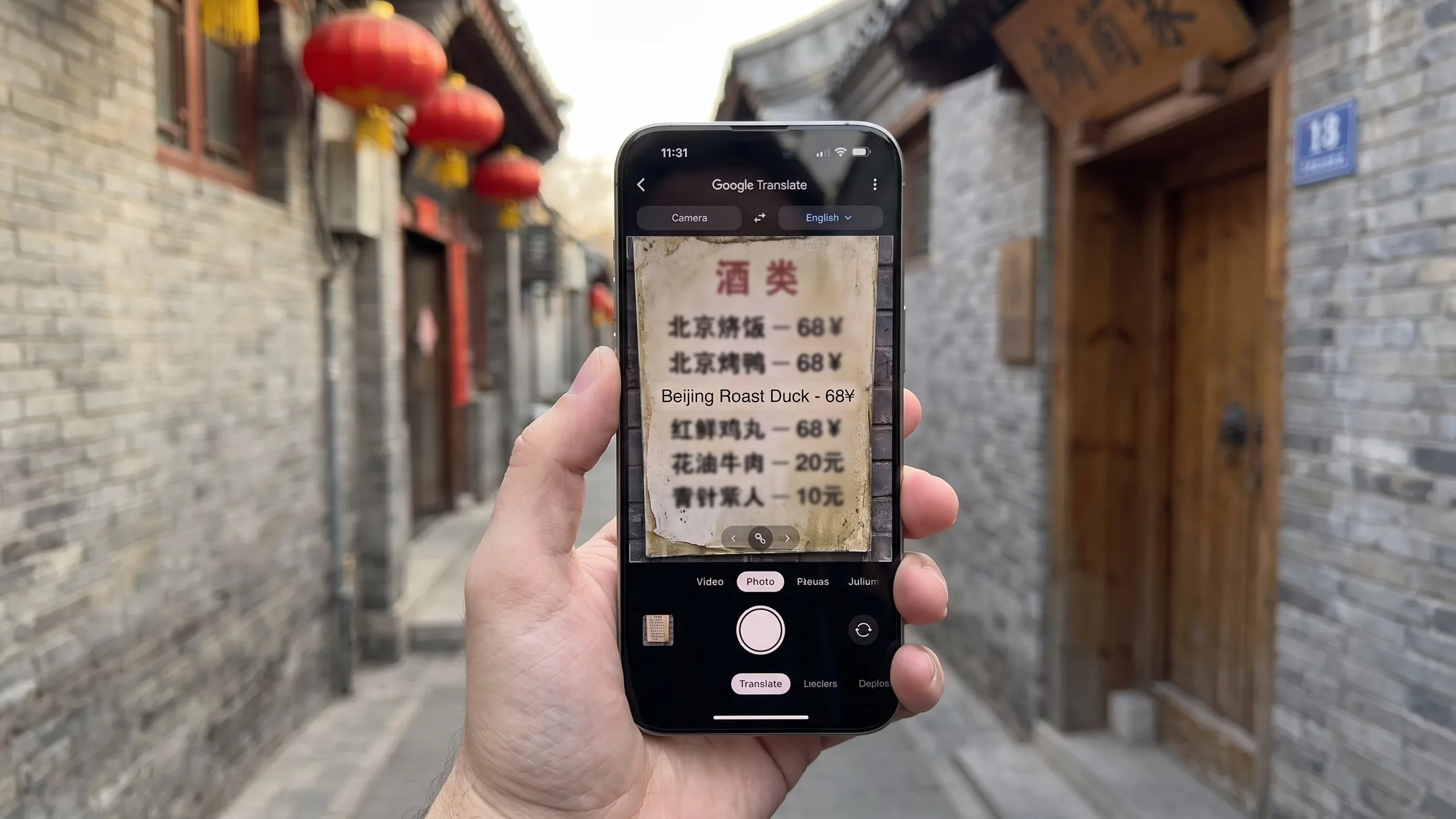
- Camera translation: point your phone at a Chinese menu or sign and see it translated in real time
- Conversation mode: real-time two-way voice translation between you and a Chinese speaker
- Handwriting input: draw Chinese characters with your finger if you don’t know how to type them
- Photo translation: translate text in photos you’ve already taken
The downside in China:
- Google services are blocked in mainland China. You’ll need a VPN for the app to work
- See our VPN guide for the 2026 workarounds
- Offline mode (downloaded language pack) works without VPN — your best friend when the network is slow
Pricing: Free with ads in some interfaces. No premium tier.
Best for: First-time visitors who already have a VPN or plan to use offline mode.
2. Pleco — Best for serious Chinese learners
Why it’s #2:
- The definitive Chinese-English dictionary for iOS and Android
- Audio pronunciation by native speakers
- Handwriting recognition that handles messy Chinese characters
- OCR (optical character recognition) — point your camera at a Chinese sign and get the dictionary definition
- Flashcards and spaced repetition for learning vocabulary
- Document reader for translating full PDFs in Chinese
- Voice recognition with tone-aware pronunciation
The downside:
- The basic app is free; advanced features (OCR, voice, full-text search) cost $30–90 in add-ons
- Less polished UI than Google Translate
- Designed for people who want to actually learn Chinese, not just translate signs
Pricing: Free basic, $30 OCR add-on, $90 full bundle. Worth it for serious learners.
Best for: Travelers planning multiple China trips, people learning Mandarin, or anyone who wants to read a Chinese newspaper.
3. Apple Translate — Best for iPhone users
Why it’s #3:
- Free, no ads, no in-app purchases
- Works offline by default (downloads language packs automatically)
- Conversation mode with side-by-side bilingual display
- Camera translation with on-device processing (faster, more private)
- Clean iOS-native design
- Voice and text translation
- 13 languages including Mandarin
The downside:
- iOS only (no Android)
- Fewer languages than Google (13 vs 108)
- Less accurate on rare or technical terms
- No handwriting input
- No photo translation (only live camera)
Pricing: Free, included with iOS 18+.
Best for: iPhone users who don’t have a VPN and want a clean, simple, offline-capable translator.
4. Baidu Translate — Best Chinese-developed option
Why it’s #4:
- 200+ languages with the strongest Chinese-English translation quality of any app
- Photo, voice, and text translation
- Real-time AR translation — point camera at any text and see translation overlaid
- Offline mode with downloadable packs
- Free academic documents translation
The downside:
- Some features (advanced AI translation) require sign-in
- AR translation can be slow
- Less user-friendly UI for English speakers
- Best Chinese servers — but no VPN issues since it’s Chinese
Pricing: Free with optional VIP tier (¥30/month / $4) for advanced features.
Best for: Travelers who want the most accurate Chinese-English translation and don’t mind a Chinese-developed app.
5. Microsoft Translator — Best for business travelers
Why it’s #5:
- 130+ languages with strong enterprise features
- Multi-person conversation (up to 100 people in a chat) — useful for business meetings
- Offline mode for 70+ languages
- Image and voice translation
- Phrasebook for saved translations
- Integration with Microsoft Office — translate Word, PowerPoint, Excel in real time
The downside:
- Less accurate on Chinese idioms and slang
- Microsoft services have variable performance in China
- Slower than Google Translate for camera mode
Pricing: Free with Microsoft account.
Best for: Business travelers and remote workers.
6. Waygo — Best for menus and signs (offline)
Why it’s #6:
- Offline-only by design (no network needed)
- Specialized for Chinese, Japanese, Korean menus and signs
- Point camera at a menu and see translation instantly
- No VPN required in China
- Free with limits (10 translations/day), $4.99/month for unlimited
The downside:
- Niche use case (menus and signs only)
- Smaller dictionary than Google or Pleco
- Limited voice and text features
Pricing: Free with 10/day limit, $4.99/month for unlimited.
Best for: Travelers who don’t have a VPN and need a menu-translation fallback.
The optimal setup (recommended)
For a 7-day China trip, install these three apps before you leave home:
- Google Translate — your primary translator, with offline Mandarin pack downloaded
- Pleco (free version) — for looking up characters and learning 20 essential phrases
- Apple Translate (iPhone) or Baidu Translate (Android) — your VPN-free backup
Total cost: $0. Total time to set up: 15 minutes.
How to use them in real situations
Reading a menu
- Google Translate camera (with VPN) — point at menu, instant translation
- Baidu Translate (no VPN) — same function
- Waygo (no VPN) — designed for this
- If no app works, find a picture of the dish (Google image search) and show it to the server
Talking to a local
- Google Translate conversation mode — speak English, your phone speaks Mandarin to them, they respond in Mandarin, your phone speaks English back
- Apple Translate — same function, no VPN needed
- Carry a phrase card with key phrases in Mandarin characters (see our ordering food guide)
Reading a street sign
- Google Translate camera — fastest
- Pleco OCR — most accurate, gives you the dictionary definition too
- If nothing works, ask a younger Chinese person — most will use their phone to translate for you
Writing in Chinese (input)
- Google Translate handwriting — draw the character with your finger
- Pleco — same function, with proper stroke order
- iOS/Android Chinese keyboard — install the pinyin keyboard, type “nihao,” it suggests 你好
Download before you leave home
Critical: Download offline language packs before you arrive in China. Once you’re there, the Google Play Store and Apple App Store work but are slow, and the language pack download is several hundred MB.
For Google Translate:
- Open Google Translate
- Tap the language name at the top
- Select “Chinese (Simplified)”
- Tap the download icon
- Wait for the 60 MB pack to download
For Apple Translate:
- Settings → Translate → Downloaded Languages
- Tap the download icon next to “Chinese (Simplified)”
For Pleco:
- Open the app
- Tap “Add-ons” in the store
- Download the “ABC” English-Chinese dictionary
- Optional: OCR add-on (¥30) and voice packs
What to do when nothing works
- Show, don’t tell: open a photo of what you want (Google Image Search by category) and point
- Find a younger person: under-30 Chinese have usually studied English for 6+ years and have translation apps on their phones
- Use the hotel concierge: the 24-hour front desk in international-brand hotels speaks English and is free to help
- Call a translation hotline: 12301 is China’s 24/7 tourism hotline with English support
The translation apps that DON’T work in China
- DeepL — not officially available, accuracy is excellent but no Chinese support
- ChatGPT/Claude/Gemini — work with VPN, but unreliable in real-time conversation mode
- Microsoft Edge Translate — built into Edge browser, blocked in China
- Most VPN-required apps — without a VPN, they don’t function
For more on the China internet situation, see our VPN guide.
What real travelers say
Based on aggregated Reddit r/China and TripAdvisor reports (as of 2026):
- Most-used app: Google Translate (60% of foreign visitors)
- Highest-rated app: Apple Translate for simplicity, Pleco for Chinese accuracy
- Most useful feature: Camera translation for menus and signs
- Biggest pain point: Google services blocked without VPN
Verified: “Pleco is the definitive Chinese dictionary for iOS and Android, with audio pronunciation, handwriting recognition, OCR, flashcards, and document reader” — Pleco.com, accessed 2026-07-24
Pro tip: the “show and tell” trick
Even with the best app, sometimes a translation just doesn’t work. The universal Chinese fallback is showing a picture. Open your phone’s image gallery, search Google for “toilet” or “coffee” or “no spicy,” and show the resulting image. This is faster, more reliable, and more polite than trying to mime the concept.
Pair your translation app with essential Chinese phrases and you’ll be functionally bilingual for any travel situation in China.
Where to book
With Pleco or Google Translate ready, you can read menus and signs. Start booking:
- Find Beijing hotels — most staff speak some English
- Browse all China hotels
Affiliate disclosure: Some links above are affiliate links. We may earn a commission at no extra cost to you. See our Affiliate Disclosure for details.
Plan your trip — verified tools
These free tools are built on real, monthly-verified data and help you skip the trial-and-error phase of China trip planning:
- China 6-City 5-Day Budget Calculator — Real 2026 prices for 5 days in Beijing, Shanghai, Guangzhou, Chengdu, Xi’an, or Hangzhou. Budget / mid-range / comfort tiers, broken down line by line.
- China 240-Hour Visa-Free Transit Checker — 57 countries, 24 provinces, 65 ports. See if you qualify for 10-day visa-free transit, which cities you can visit, and the 5-step process.
- China eSIM Finder 2026 — Pick the right China eSIM in 30 seconds. Airalo vs Holafly vs Nomad with 2026 pricing, coverage by city tier, and a VPN firewall quick-reference.
- China OTA Comparison 2026 — Trip.com vs Booking.com vs Agoda vs Klook across 5 booking types. Inventory, pricing, foreign card support, English service, per-OTA verdict.
Verified August 2026 by TravelHubChina Editorial. We re-check prices and policy details monthly so the data doesn’t drift.
Step by step
-
Download 3 apps + offline language packs before flying
Install Google Translate (108 languages, free offline mode for 59), Pleco (the definitive Chinese dictionary, free with $30-90 add-ons), and Baidu Translate (best Chinese-English accuracy, works without a VPN in China). Total setup: 15 minutes, ideally done on home Wi-Fi before the flight.
-
Set up Google Translate offline Chinese pack (60 MB)
Open Google Translate, tap the language name at the top, select 'Chinese (Simplified)', tap the download icon. Wait for the 60 MB pack to finish. The offline pack gives you text translation without internet — but camera, conversation, and voice still need a connection (and Google services are blocked in China without a VPN).
-
Set up a working VPN for Google services
Google Translate, Google Maps, Gmail, and most Western apps are blocked in mainland China without a VPN. Install and test your VPN (Astrill, ExpressVPN, NordVPN, or Surfshark) BEFORE flying. Free trials usually work for short trips. Alternative: rely on Baidu Maps + Baidu Translate for fully no-VPN coverage.
-
Use camera translation for menus and signs
Open Google Translate or Baidu Translate, tap the camera icon, point at a Chinese menu or sign. The app overlays English translation in real time. This is the single most useful feature for travel — order food, read signs, check prices without typing a single character.
-
Use conversation mode for talking to locals
In Google Translate or Apple Translate, tap the conversation icon, set English to Chinese, tap the microphone. Speak English; the phone speaks Mandarin to them. They respond in Mandarin; the phone speaks English back. Baidu Translate works the same way. Slow down and speak clearly — accuracy drops with fast speech.
FAQ
-
What is the best translation app for China in 2026?
Pleco is the best for offline dictionary and reading translation. For real-time camera and conversation translation, Google Translate (with a VPN) and Baidu Translate are the top picks. iPhone users can also use the built-in Translate app. The combination of Pleco + Baidu Translate covers nearly all situations, even without internet. -
Does Google Translate work in China?
Google Translate is blocked in mainland China without a VPN. With a VPN, it works well for text and conversation translation. Its camera translation is best-in-class. The offline Chinese language pack (1.5 GB) can be downloaded before your trip, giving you basic translation even without a VPN — but real-time features (camera, conversation, voice) require a working connection. -
Can I use Pleco without internet in China?
Yes. Pleco is designed for offline use. The basic dictionary works without any connection. Add the paid Chinese-English dictionary (one-time $30-40 purchase) and you have full offline translation for text, character recognition, and stroke order. Pleco does not have a real-time conversation mode, but it is unmatched for reading menus, signs, and short texts. -
How accurate is Baidu Translate for travelers?
Baidu Translate is the most accurate English-to-Chinese translator for mainland China usage — it understands mainland idioms, food terms, and place names better than Google. It works in China without a VPN. The camera and conversation modes are reliable. The UI is partly in Chinese but usable. Download it before you fly.
Related guides
- Tools & Resources
China Daily Budget 2026: Beijing, Shanghai + 5 More
Verified 2026 per-person daily budget for 7 China cities in 4 travel styles. Line-item breakdown and 4 city-specific cost traps to avoid.
10min read
- Tools & Resources
Trip.com for Foreigners: The Complete 2026 Guide
Complete 2026 Trip.com guide for foreign travelers: registration, payment methods, coupons, 6-tier loyalty, refunds, price-match, and 5 places where Trip.com is the wrong choice. Verified 2026-09-06.
9min read
- Tools & Resources
Cheapest Flights on Trip.com (2026): Timing + Hacks
Verified 2026 playbook for booking the cheapest flights on Trip.com — booking windows, cheapest days, Air Flexibility, Bundle-and-Save, Price Alerts, and 5 China flight tips. Verified 2026-09-06.
8min read
- Tools & Resources
China Travel Insurance: Complete 2026 Guide (Best Plans, Costs, and What You Actually Need)
Do you need travel insurance for China? Compare the top 5 plans for 2026 (World Nomads, SafetyWing, Allianz, IMG, Seven Corners) by cost, medical coverage, evacuation, adventure activities, and pre-existing conditions. Plus what China-specific risks insurance must cover, how to claim if hospitalized, and the cheapest way to get $100K+ medical coverage.
9min read
- Tools & Resources
How Much Does a Trip to China Cost in 2026? Complete Budget Guide by Travel Style
Real 2026 prices for a trip to China: 3 budget tiers (backpacker $80-150/day, mid-range $200-350, comfort $500+) with line-item breakdown for accommodation, food, transport, attractions, and visas. Plus 5 sample 7-14 day itineraries with total cost, 15 money-saving tips, and the full payment methods guide (Alipay, WeChat Pay, cash, credit card).
11min read
- Tools & Resources
Trip.com vs Booking.com vs Klook for China (2026): Which One, When
Honest 2026 comparison of the 3 booking platforms foreign travelers actually use for China. Real prices, real inventory, real scenarios — not 'Trip.com is cheaper' marketing. Beijing 3-day worked example included.
12min read