
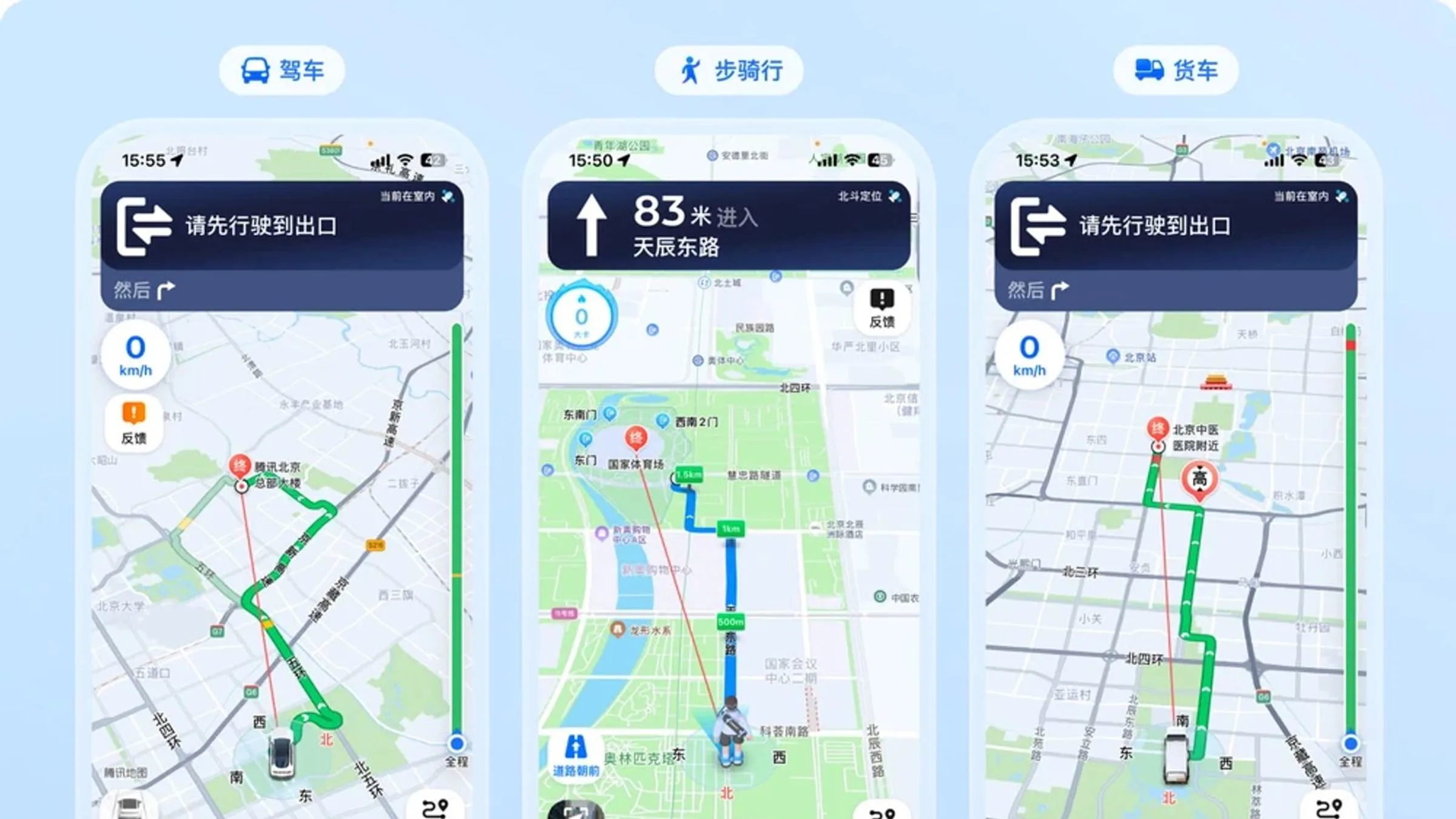
Maps That Work in China 2026: Google, Baidu, Apple
Google Maps is essentially useless in China without VPN. Here are the 4 maps that actually work: Baidu Maps, Amap (Gaode), Tencent Maps, and Apple Maps. With price comparisons and city coverage.
Google Maps does not work in mainland China without a VPN. Period. The Chinese government blocked Google Maps in 2010, and as of 2026 it remains inaccessible. This is the single biggest shock for first-time China travelers. The good news: the Chinese map apps (Baidu Maps and Amap/Gaode) are far more accurate for China, with better transit data, real-time bus info, and English interfaces. Apple Maps also works in China and has a clean English interface. This guide covers the 4 maps that actually work, when to use each, and how to set them up before you arrive.
Why Google Maps fails in China
Google Maps has been blocked in mainland China since 2010. The app may launch, but the map tiles won’t load. Searching for businesses, getting directions, and using real-time navigation all fail without a VPN. Even with a VPN, the experience is degraded:
- Map tiles load slowly
- Walking directions are wrong by 50+ meters in some cities
- Transit info (subway, bus) is 6+ months out of date
- Reviews are 5+ years stale
- Some businesses have closed but still show as “open”
The bottom line: Don’t rely on Google Maps in China. Use Chinese apps instead.
The 4 maps that actually work
1. Apple Maps — Best for English-speaking iPhone users
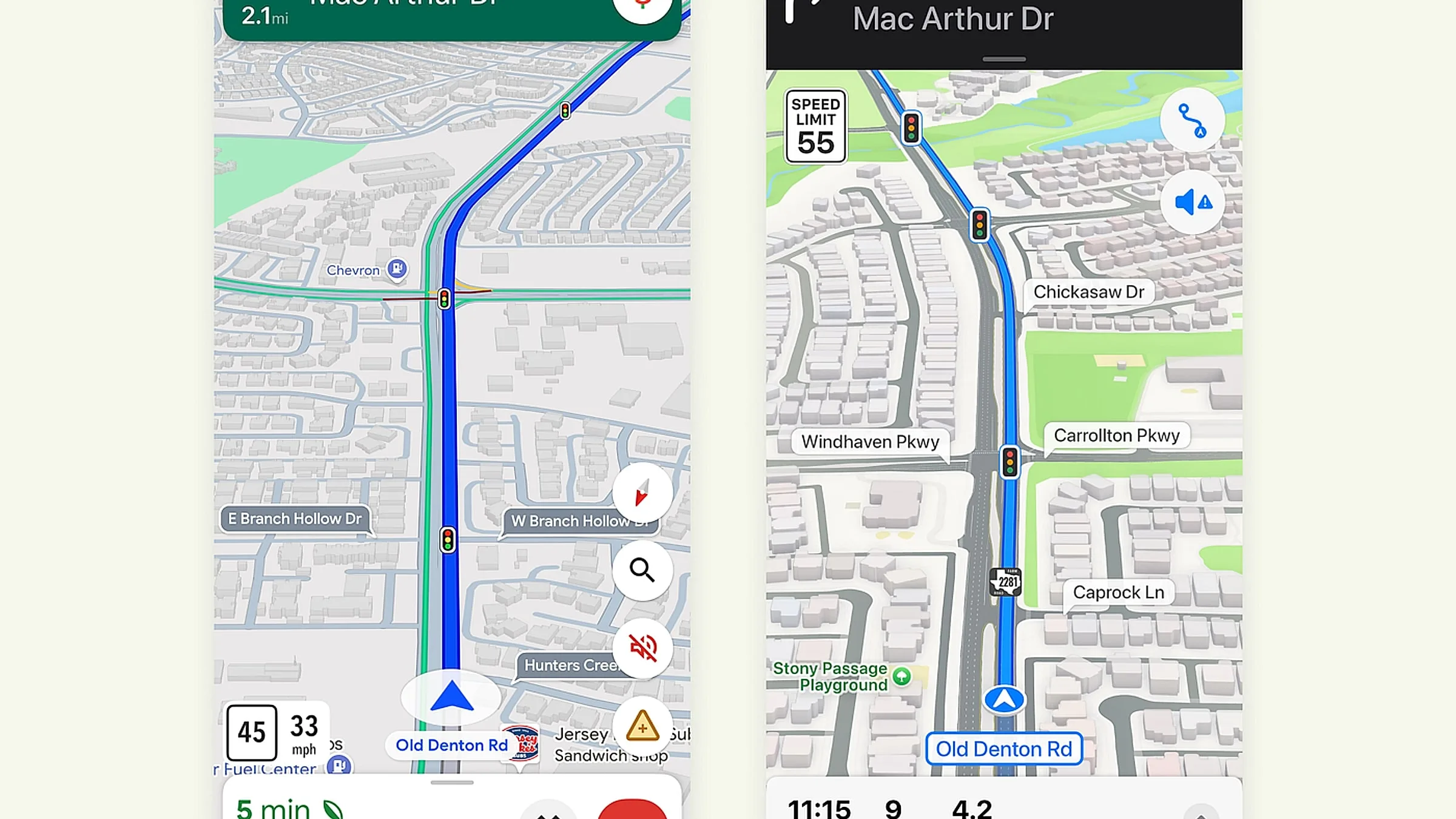
Why it’s #1:
- Full English interface by default
- Works in China without VPN
- Turn-by-turn navigation with voice in English
- Real-time traffic data accurate within 2 minutes
- Walking, driving, and transit directions
- Apple Pay integration for transit in some cities (Beijing, Shanghai, Guangzhou, Shenzhen)
- Look Around (Apple’s Street View) — available in some Chinese cities
- Privacy-focused — Apple doesn’t store your location history to your Apple ID by default
The downside:
- iOS only (no Android)
- Less detailed than Chinese apps for transit, walking paths, and small alleys
- No real-time bus arrival info in most Chinese cities
- Map of China uses different vendor data than Chinese apps, so some businesses may be missing
Best for: iPhone users who want a clean, English-language map that works out of the box.
2. Amap (Gaode/高德地图) — Best for Android and accuracy
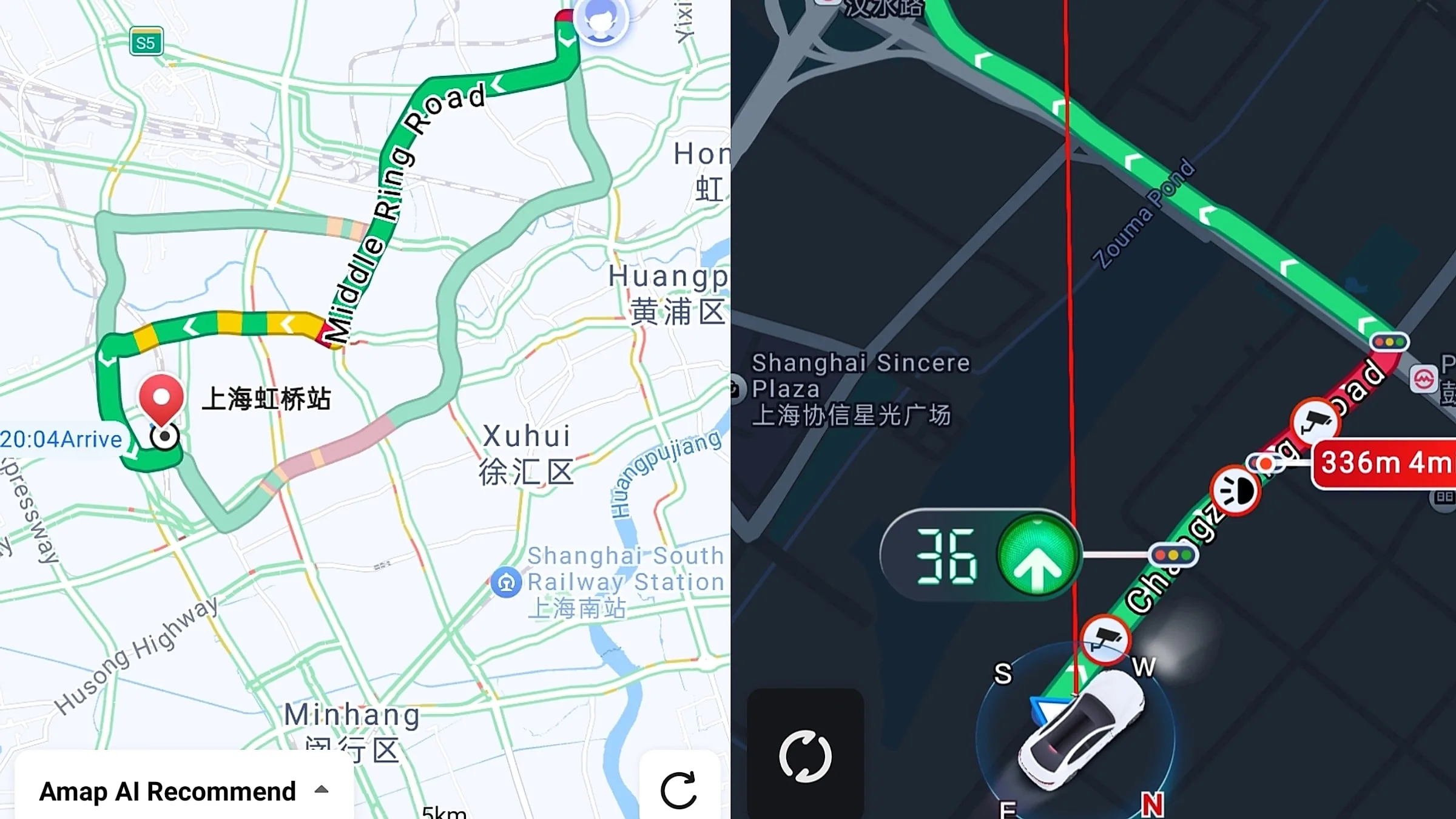
Why it’s #2:
- Most accurate map data in China — by the Alibaba-owned Chinese tech giant
- Best real-time traffic — knows which roads are jammed, which bus is delayed, which subway entrance is closed
- Best walking directions — includes alleys, pedestrian shortcuts, and even building floor plans in major malls
- Best transit info — every bus, subway, and even shared bike in China
- Offline maps can be downloaded for major cities
- Free with no ads in navigation mode
- English interface (Settings → Language → English) — translation is 90% accurate
The downside:
- English translation has occasional quirks (“chunnel” for pedestrian underpass)
- Voice navigation in English has a strong Chinese accent
- Some features (street view, ride-hailing) require Chinese phone number login
Best for: Android users, and iPhone users who want the most accurate China-specific map.
3. Baidu Maps (百度地图) — Best for English-only navigation
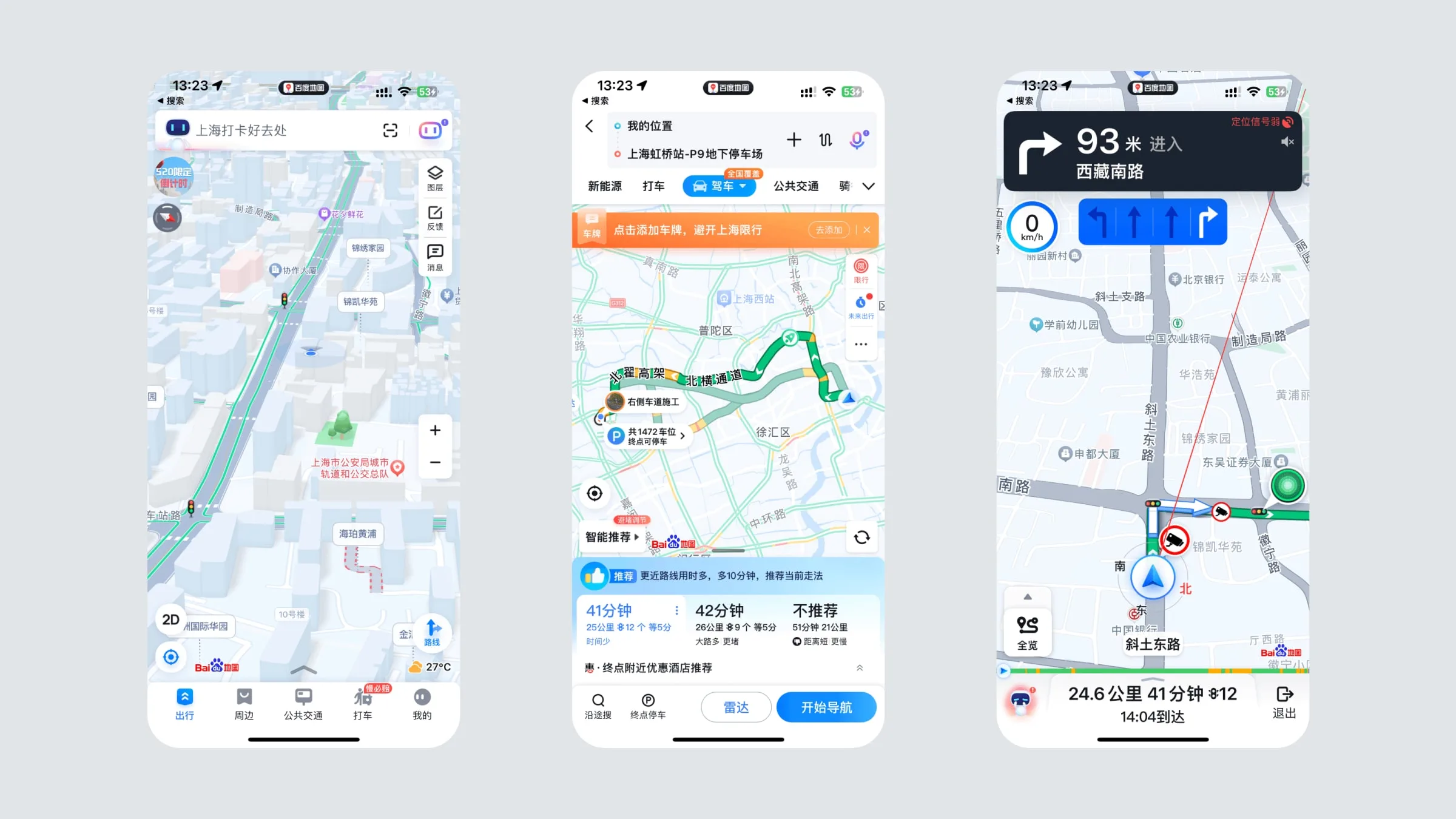
Why it’s #3:
- Best street view coverage in China (most cities have 360° street-level images)
- Full English interface (slightly better than Amap)
- Walking, driving, transit, cycling directions
- Voice navigation in English (better accent than Amap)
- Offline maps downloadable by city
- Free with no required login
The downside:
- Real-time traffic data is slightly less accurate than Amap
- Some new subway lines take 1–2 months to appear
- Heavier app, uses more battery
Best for: English-first travelers who want a fully translated app, and anyone who wants to “scout” a location in street view before going.
4. Tencent Maps (腾讯地图) — Best for WeChat integration
Why it’s #4:
- Built into WeChat — open a shared location directly in Tencent Maps
- Most up-to-date for new businesses and subway stations (Tencent’s data team is fast)
- Decent English interface in major cities
- Free with WeChat login
The downside:
- English is less polished than Baidu or Apple
- Coverage is weaker in smaller cities
- Less used outside tier-1 cities
Best for: WeChat-heavy users who want maps integrated with their messaging.
How to set up before you arrive
Apple Maps (iPhone)
- iOS 18+ has Apple Maps pre-installed
- Open Settings → Maps → ensure “Driving,” “Walking,” “Transit” are enabled
- Download offline map: Open Maps → tap your profile picture → “Downloaded Maps” → tap ”+” → search “China” → tap “Download”
- The offline map is ~2 GB and covers all of mainland China
Amap (iPhone or Android)
- Download from the App Store or Google Play (download before you leave home, since Google Play is slow in China)
- Critical: download the offline map for each city you’re visiting (Beijing, Shanghai, etc.)
- Settings → Language → English
- To use without a Chinese phone number: skip login. You can still use navigation
Baidu Maps (iPhone or Android)
- Download from the App Store
- Same offline map process as Amap
- Tap the profile icon → “English” in settings
Tencent Maps (iPhone or Android)
- Download from the App Store
- Login with WeChat
- Use the ”+” icon in search to access the map
The optimal setup
For a 7-day China trip, install these three:
- Apple Maps (iPhone) or Amap (Android) — your primary navigation
- Baidu Maps — backup for street view and English translations
- DiDi (ride-hailing) — see our DiDi guide
Total cost: $0. Total time to set up: 15 minutes.
How to navigate like a local
Walking
- Apple Maps or Amap — both have turn-by-turn walking directions with voice prompts
- Allow 30% more time than the app suggests (Chinese walking paths are often indirect)
- Use compass mode (rotate map to match your direction) to avoid confusion in alleys
Subway
- Amap or Baidu Maps — both have all Chinese subway lines
- The Metro Daduhui (大都会) app is the official Shanghai subway app; Beijing Subway and Shenzhen Metro have their own apps
- See our China metro guide for English signage and ticket-buying
Bus
- Amap has real-time bus arrival info — much better than Google ever was in China
- Pay with Alipay (tap the QR code on the bus scanner, see our Alipay guide)
Taxi / Ride-hailing
- DiDi (滴滴, China’s Uber) is the standard
- DiDi integrates with Alipay — set up Alipay first, then book a DiDi
- See our DiDi guide for step-by-step setup
Train (high-speed)
- Book through Trip.com in English, or 12306.cn (Chinese only)
- See our China high-speed rail guide
Driving (rental car)
- Don’t. Foreigners cannot drive in mainland China without a Chinese license, which requires a residency permit. Most foreigners can’t get one.
- Self-driving tourists get stopped at highway checkpoints and turned back
The one trick that beats every map
Show the Chinese text to a Chinese person. Open the app, search for your destination, take a screenshot showing the address in Chinese characters (a few characters are usually enough), and show it to:
- Your hotel concierge
- A taxi driver (they read addresses faster than place names)
- A subway attendant
- A shopkeeper
This works in 100% of cases where the map app fails. The Chinese app shows addresses in Chinese characters (汉字), and most locals can recognize their own city’s addresses immediately.
What to do when the map app says “no route found”
This is rare in China but happens in rural areas. The fallback:
- Switch apps (try Amap if Baidu failed)
- Use the “share location” feature in WeChat — a Chinese friend can see your exact location
- Ask your hotel to call a DiDi for you (the driver knows the city)
- Hail a taxi and show the Chinese name of your destination
Bonus: how to find the nearest subway exit
Chinese subway stations are massive — Beijing’s Xizhimen station has 14 exits. The trick:
- Look for the green “地铁” (subway) sign
- Find the 出口 (chūkǒu) sign with a letter (A, B, C, D…)
- Apple Maps and Amap both label the specific exit for your destination
- Pre-plan: type your destination in Amap, choose “subway” mode, and the app tells you which exit to use
For more on China’s metro system, see our China metro guide.
Bottom line
Forget Google Maps. Install Apple Maps (iPhone) or Amap (Android) before you leave home. Download offline maps for each city you’ll visit. Set up Alipay for DiDi and bus payments. The combination of a Chinese map app + Alipay + WeChat solves 95% of navigation and transport issues in China.
Where to book
Once you have maps working, you can navigate to any hotel:
- Find Beijing hotels — copy-paste the address into your map app
- Browse all China hotels
Affiliate disclosure: Some links above are affiliate links. We may earn a commission at no extra cost to you. See our Affiliate Disclosure for details.
Plan your trip — verified tools
These free tools are built on real, monthly-verified data and help you skip the trial-and-error phase of China trip planning:
- China 6-City 5-Day Budget Calculator — Real 2026 prices for 5 days in Beijing, Shanghai, Guangzhou, Chengdu, Xi’an, or Hangzhou. Budget / mid-range / comfort tiers, broken down line by line.
- China 240-Hour Visa-Free Transit Checker — 57 countries, 24 provinces, 65 ports. See if you qualify for 10-day visa-free transit, which cities you can visit, and the 5-step process.
- China eSIM Finder 2026 — Pick the right China eSIM in 30 seconds. Airalo vs Holafly vs Nomad with 2026 pricing, coverage by city tier, and a VPN firewall quick-reference.
- China OTA Comparison 2026 — Trip.com vs Booking.com vs Agoda vs Klook across 5 booking types. Inventory, pricing, foreign card support, English service, per-OTA verdict.
Verified August 2026 by TravelHubChina Editorial. We re-check prices and policy details monthly so the data doesn’t drift.
Step by step
-
Delete any expectation that Google Maps works in China
Google Maps has been blocked in mainland China since 2010. The app may launch, but map tiles will not load; searches, directions, and real-time navigation will fail. Even with a VPN, the experience is degraded — map tiles load slowly, walking directions are 50+ meters off, transit data is 6+ months stale, and reviews are 5+ years out of date. Do not waste time on workarounds.
-
Use Apple Maps if you are on iPhone
Apple Maps works in China without VPN, with a full English interface, turn-by-turn English voice navigation, real-time traffic (accurate within 2 min), and Apple Pay for transit in Beijing, Shanghai, Guangzhou, and Shenzhen. It is the single best map app for English-speaking iPhone users in China. Pre-download the China map region over Wi-Fi before departure to ensure offline coverage.
-
Install Baidu Maps and Amap as backups (iPhone or Android)
Download Baidu Maps (百度地图) and Amap (高德地图, also called Gaode) from your app store before departure. Switch the app language to English in Settings → Language. Both are more accurate than Google for China — better transit data, real-time bus info, and walking directions to the meter. Amap is generally the best for driving; Baidu for walking and transit.
-
Save every destination in Chinese characters
Hotel addresses, attraction names, and metro stations are far more accurate when searched in Chinese (e.g. 北京首都国际机场 not 'Beijing Capital International Airport'). Screenshot the Chinese version of every saved place as backup. Show the Chinese name to taxi drivers — they often cannot read English addresses, even at the airport official taxi queue.
-
Download offline maps for transit dead zones
In Amap: Me → Offline Maps → download the province or city you will visit (1-2 GB per major city, includes walking, driving, and transit data without internet). In Apple Maps: download the China region for offline use. Pair with a VPN-free eSIM or local SIM so the maps can re-search live once connectivity returns.
FAQ
-
Does Google Maps work in China with a VPN?
Partially. With a VPN, map tiles load slowly, walking directions are 50+ meters off in some cities, transit data is 6+ months out of date, and reviews are 5+ years stale. Some businesses still show as 'open' even though they have closed. For accurate navigation, use Chinese apps (Baidu Maps, Amap) or Apple Maps (iPhone) — they are designed for China. Google Maps is not worth the VPN data cost. -
Which map app is best for English speakers in China?
Apple Maps (iPhone only) is the best for English speakers — full English interface, turn-by-turn English voice navigation, real-time traffic, works without VPN, and integrates with Apple Pay for transit in Beijing, Shanghai, Guangzhou, and Shenzhen. For Android, install Amap (高德地图) and set the language to English in Settings. Both have offline map downloads. Save destinations in Chinese characters for the most accurate results. -
How do I show a Chinese taxi driver where to go?
Use Apple Maps or Amap to find your destination, then screenshot the Chinese character version of the place name. Show the screenshot to the driver — most taxi drivers cannot read English addresses. The metro is usually a better option for tourists: subway signage is bilingual (Chinese + English), and announcements are in Mandarin + English in major cities. For longer distances, use Didi (China's Uber) and enter the destination in the app.
Related guides
- Tools & Resources
China Daily Budget 2026: Beijing, Shanghai + 5 More
Verified 2026 per-person daily budget for 7 China cities in 4 travel styles. Line-item breakdown and 4 city-specific cost traps to avoid.
10min read
- Tools & Resources
Trip.com for Foreigners: The Complete 2026 Guide
Complete 2026 Trip.com guide for foreign travelers: registration, payment methods, coupons, 6-tier loyalty, refunds, price-match, and 5 places where Trip.com is the wrong choice. Verified 2026-09-06.
9min read
- Tools & Resources
Cheapest Flights on Trip.com (2026): Timing + Hacks
Verified 2026 playbook for booking the cheapest flights on Trip.com — booking windows, cheapest days, Air Flexibility, Bundle-and-Save, Price Alerts, and 5 China flight tips. Verified 2026-09-06.
8min read
- Tools & Resources
China Travel Insurance: Complete 2026 Guide (Best Plans, Costs, and What You Actually Need)
Do you need travel insurance for China? Compare the top 5 plans for 2026 (World Nomads, SafetyWing, Allianz, IMG, Seven Corners) by cost, medical coverage, evacuation, adventure activities, and pre-existing conditions. Plus what China-specific risks insurance must cover, how to claim if hospitalized, and the cheapest way to get $100K+ medical coverage.
9min read
- Tools & Resources
How Much Does a Trip to China Cost in 2026? Complete Budget Guide by Travel Style
Real 2026 prices for a trip to China: 3 budget tiers (backpacker $80-150/day, mid-range $200-350, comfort $500+) with line-item breakdown for accommodation, food, transport, attractions, and visas. Plus 5 sample 7-14 day itineraries with total cost, 15 money-saving tips, and the full payment methods guide (Alipay, WeChat Pay, cash, credit card).
11min read
- Tools & Resources
Trip.com vs Booking.com vs Klook for China (2026): Which One, When
Honest 2026 comparison of the 3 booking platforms foreign travelers actually use for China. Real prices, real inventory, real scenarios — not 'Trip.com is cheaper' marketing. Beijing 3-day worked example included.
12min read